Quick Facts
- Launch Date: April 2006
- Current Scale: Over 1 billion monthly users as of April 2026
- Language Support: Nearly 250 languages covering 95% of the world's population
- Word Volume: Processing approximately 1 trillion words per month
- Core Technology: Advanced Gemini AI models with context-aware analysis
- Essential Travel Features: Offline language packs and instant camera translation
- Latest Innovation: AI-powered pronunciation practice with real-time feedback
As Google Translate turns 20 in 2026, it has evolved from a basic tool into a Gemini-powered universal translator supporting 250 languages. Key Google Translate features for international travel include offline language packs and instant camera translation, allowing users to navigate foreign landscapes and communicate across language barriers without requiring a constant internet connection.
The Evolution: From SMT to Gemini AI
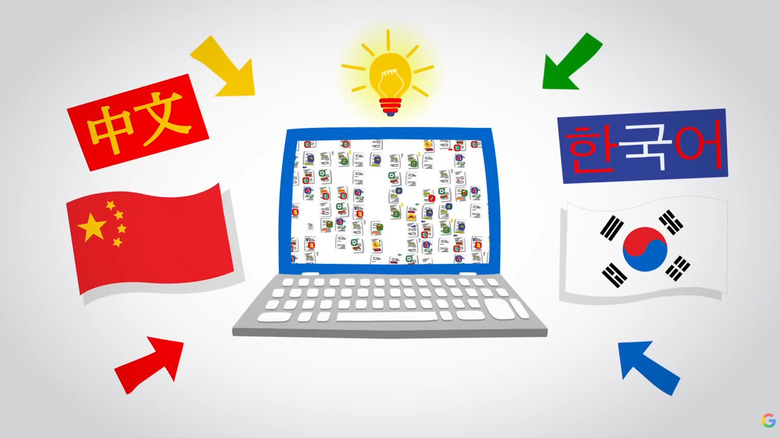
I remember the early days of mobile tech when "translation" meant carrying a physical pocket dictionary or waiting minutes for a clunky web page to load a stiff, word-for-word interpretation. When Google launched its translation service in April 2006, it relied on Statistical Machine Translation (SMT). This method used vast amounts of United Nations and European Parliament transcripts to find patterns. While it was revolutionary for its time, the results often lacked the flow of natural language processing and frequently missed the mark on syntax analysis.
The real turning point for those of us tracking mobile software came in 2016. Google transitioned to Neural Machine Translation (GNMT), which began looking at whole sentences rather than just individual words. This shift reduced errors by a staggering 55% to 85% in many major language pairs. Today, as we celebrate the 20th anniversary, the integration of Gemini AI models has pushed the boundaries even further. We are no longer just looking at accuracy; we are looking at context-aware analysis and the ability to mimic human-like linguistic nuance.
To understand how far we have come, look at the technical leap between these eras:
| Era | Core Technology | Capability Focus |
|---|---|---|
| 2006 - 2015 | Statistical Machine Translation (SMT) | Pattern matching and word-for-word translation |
| 2016 - 2024 | Neural Machine Translation (GNMT) | Sentence-level context and neural networks |
| 2025 - 2026+ | Gemini AI Integration | Real-time tone adjustment and complex nuance |
The current iteration of Google Translate features handles a massive load of 1 trillion words per month. This isn't just happening in the standalone app; it is deeply integrated into Search, Lens, and Circle to Search, making the tool a ubiquitous part of the modern smartphone experience. If you are wondering how to get context aware translations in google translate app today, the secret lies in these machine learning models that analyze the surrounding text to determine if "bank" refers to a financial institution or the side of a river.
Offline Translation: The International Traveler’s Lifesaver
If you have ever landed in a foreign country only to realize your roaming data isn't working, you know the panic of not being able to read a single sign. This is where offline translation for travel becomes your most valuable mobile asset. For years, I have advised travelers to make downloading offline language packs their first step when planning a trip.
Setting Up for Success
To ensure you aren't stranded, you need to manage your language packs before you leave home.
- Open the app and tap on your profile icon.
- Select Downloaded languages.
- Browse the list of nearly 250 languages and tap the download arrow next to your destination's primary tongue.
For most users, downloading English, Spanish, or French is standard, but the app now supports many more regional dialects. Once these packs are on your device, the app uses on-device machine learning models to provide high-quality results without a data signal. This is a critical tip for how to use google translate offline for international travel: always check for updates to your downloaded packs before you fly, as Google frequently optimizes the file sizes and accuracy.
Storage Management
Managing google translate offline language packs for storage is easier than it used to be. Most packs are now highly compressed, but if you are using a device with limited internal memory, you should delete packs for countries you aren't currently visiting. On Android devices, you can also enable google translate tap to translate on android apps. This feature allows you to highlight text in any messaging app and see a translation in a floating window, even when you are offline, provided the specific language pack is installed.
Visual Translation: Using Camera Mode for Menus and Signs
One of the most impressive Google Translate features is the visual translation capability, which traces its lineage back to the acquisition of Word Lens. For a mobile editor, seeing visual translation evolve into what it is today has been a highlight of the last decade. It uses the camera on your smartphone to recognize text and overlay the translation directly onto the image on your screen.
Navigating the World Through Your Lens
Using the instant camera translation guide is straightforward, but there are a few tricks to getting the best results. When you open the camera mode, you have three primary options:
- Instant: This translates text the moment you point your camera at it. It is perfect for large signs and headers.
- Scan: If the text is small or the lighting is poor, using the scan mode allows you to take a still photo and highlight the specific words you need to understand.
- Import: This is useful for translating screenshots of maps or documents you received via email.
I frequently recommend using google translate camera mode for reading foreign menus because it maintains the layout of the physical menu, making it much easier to point to what you want to order. The latest updates have significantly improved the "Detect Language" feature, which is essential when traveling through multilingual regions like the Balkans or Southeast Asia.
Audio & Voice: AI Pronunciation and Interpreter Mode
The dream of a universal translator is closer than ever thanks to real-time interpretation. In the 2026 version of the app, Google has moved beyond simple voice-to-text. The addition of AI voice pronunciation tips has transformed the app into a powerful tool for active learning.
Master Your Speaking Skills
For Android users, the AI-powered pronunciation practice provides a low-pressure environment to master a new language. The tool uses machine learning models to analyze your voice input and compare it with native linguistic nuances. It provides real-time suggestions, helping you correct your accent or rhythm in languages like Spanish, Hindi, or English. If you want to know how to use google translate pronunciation practice on android, look for the small "Practice" button after you perform a voice translation. It will guide you through saying the phrase back and give you a score based on your accuracy.
Real-Time Conversations
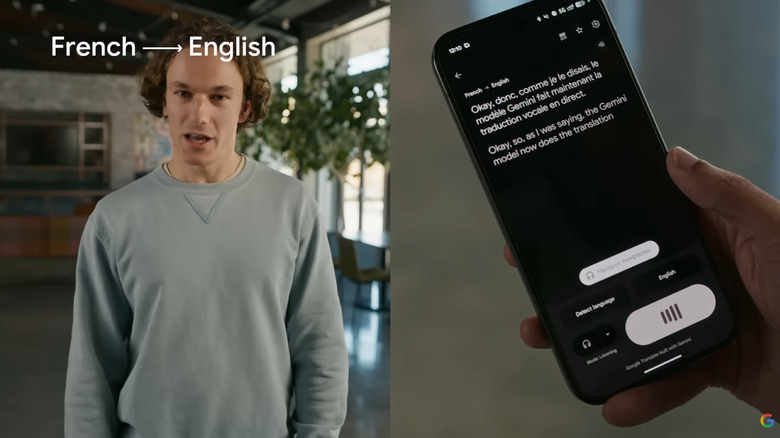
When it comes to face-to-face communication, using google translate interpreter mode for real-time conversations is the gold standard. This mode allows two people to speak naturally while the phone listens and speaks the translation for each party.
- Hands-Free Experience: You can now use google translate real time translation with wireless earphones guide to facilitate even smoother interactions. By connecting your Pixel Buds or other compatible wireless earphones, you can hear the translation directly in your ear while your phone displays the text for the other person to read.
- Contextual Flow: Because of the Gemini AI models, the interpreter mode is now better at handling long "Live Translate" sessions that last over five minutes without losing the context of the conversation.
Whether you are navigating a bustling market in Tokyo or trying to understand a legal document in Berlin, the cross-cultural communication facilitated by these tools is nothing short of world-changing. The ability to bridge the gap between people through technology remains one of the most positive impacts of the mobile revolution.
FAQ
What are the main features of Google Translate?
The core Google Translate features include text translation for nearly 250 languages, instant camera translation for signs and menus, and voice translation for real-time conversations. Additionally, the app offers offline language packs, a phrasebook for saving common expressions, and AI-powered pronunciation practice to help users improve their speaking skills.
Does Google Translate work offline?
Yes, Google Translate works offline if you download the specific language packs to your device. This allows you to perform text and camera translations without a cellular or Wi-Fi connection. It is highly recommended to download the languages you need before traveling to areas with limited internet access.
How do I use the camera translation feature?
To use the camera translation feature, open the Google Translate app and tap the camera icon. Point your phone at the text you wish to translate, such as a menu or a street sign. You can choose "Instant" to see the translation overlaid on the screen immediately, or "Scan" to capture a photo and select specific text for a more precise translation.
How do I use conversation mode for real-time translation?
To use conversation mode, tap the "Conversation" icon on the app's home screen. Select the two languages being spoken. You can then tap the microphone icon for either language or use the "Auto" setting, which allows the app to listen for both languages and provide spoken translations for a fluid, back-and-forth dialogue.
Is Google Translate free to use?
Google Translate is a free service available on the web and as an app for both Android and iOS devices. There are no subscription fees or hidden costs for accessing its primary translation features, including offline packs and camera translation.
As we look toward the future of global connectivity, the evolution of Google Translate remains a testament to how far artificial intelligence and mobile technology have come. From a desktop tool that struggled with basic grammar to a Gemini-powered personal assistant in your pocket, it has truly changed the way we see the world—one word at a time.