Quick Facts
- Top Professional Pick: Dragon Professional (Best for Legal/Medical)
- Best for Creators: Wispr Flow (Context-aware and filler word removal)
- Best Free Option: Windows Voice Access and Apple Dictation
- Efficiency Gains: Produce text up to 3x faster than typing (150 wpm vs 40 wpm)
- Model Accuracy: Word Error Rates (WER) as low as 2% to 8% on clean audio
- Market Outlook: Global voice recognition market projected to reach USD 20.8 billion by 2026
- Hardware Requirement: Local AI processing requires Apple Silicon or Copilot+ PCs for lowest latency
In 2026, the most effective dictation software integrates Natural Language Processing for high accuracy and context-aware formatting. Dragon Professional remains a top choice for specialized legal and medical terminology on Windows, while Wispr Flow provides advanced AI capabilities like filler word removal and cross-device syncing. These tools significantly increase productivity for professionals who require hands-free document creation and precise transcription.
The 2026 Native Baseline: Free Tools for Windows and Mac
As we move through 2026, the demand for precise AI speech to text tools has reached an all-time high. Choosing the right dictation software is no longer just about speed; it is about Natural Language Processing accuracy and seamless integration into your workflow. Whether you need dictation software for Windows, Mac, or mobile, modern tools now offer 95-99% accuracy to boost your hands-free productivity.
For most users, the search for the best dictation software free of charge starts and ends with the operating system. We have moved past the days of robotic, clunky recognition. Both Microsoft and Apple have poured resources into local machine learning models that run on your device's NPU (Neural Processing Unit), ensuring that your voice data stays private while maintaining incredible responsiveness.
On the PC side, Windows 11 Voice Access has become the gold standard for dictation software for windows users. Unlike the legacy speech recognition tools of the past, Voice Access allows for comprehensive PC control. You can open apps, click buttons, and grid-navigate your screen entirely by voice. If you just need to get words on a page, the standard Windows Key + H shortcut launches a refined dictation bar that leverages the same engine.
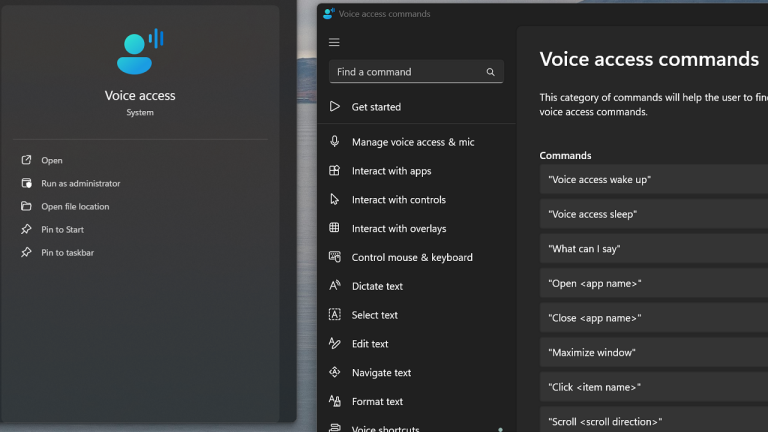
Apple users are not left behind. Apple Dictation remains the most seamless voice dictation software for mac and iOS. The recent updates to macOS leverage the high bandwidth of Apple Silicon to provide offline recognition that is nearly indistinguishable from cloud-based services in terms of accuracy. For writers who split time between an iMac and an iPad, the ability to have your custom vocabulary sync via iCloud is a massive productivity win.
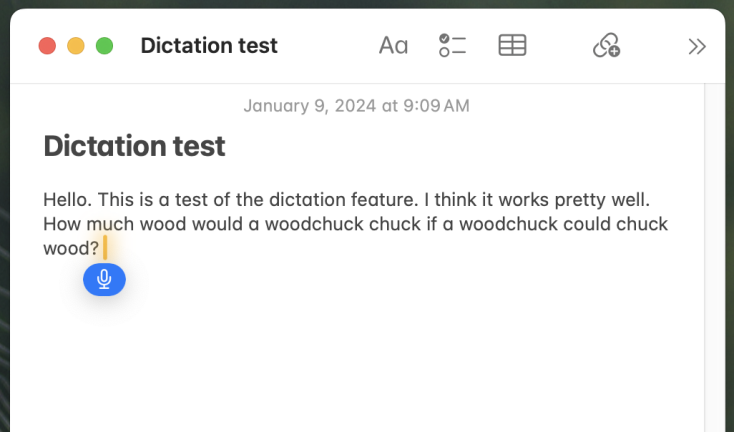
Hardware Check: Native Tools
- Windows: Requires Windows 11 22H2 or later. Best performance on Snapdragon X Elite or Intel Core Ultra chips with dedicated NPUs.
- Mac: Requires Apple M1 or newer for full offline support and continuous dictation features.
Best Dictation Software for Writers and Content Creators
If you are a professional writer, the native tools might feel a bit rigid. This is where the new wave of AI-first tools like Wispr Flow and Voicy change the game. The pain point for most writers using dictation software is the "um" and "uh" factor. Traditional tools transcribe every vocal hiccup, leaving you with a mess to edit.
Wispr Flow represents a shift in thinking. It does not just transcribe; it interprets. Using advanced Natural Language Processing, it can strip away filler words and even adjust the tone of your text based on the active window. If you are dictating into a Slack channel, it keeps things casual. If you are using dictation software for microsoft word to draft a novel or a formal report, it adopts a professional syntax.
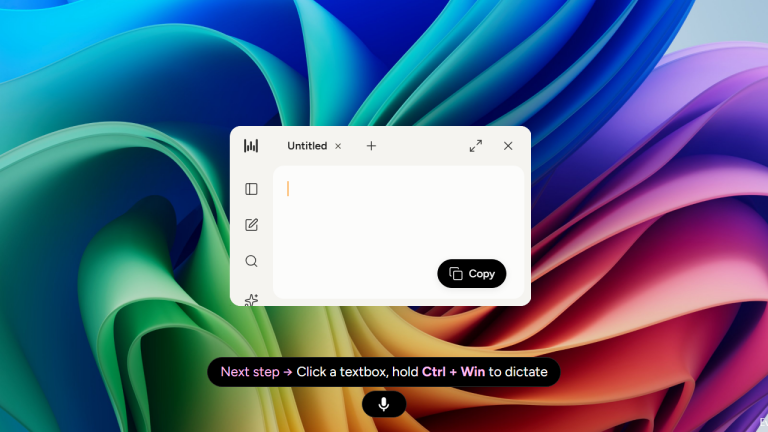
Writers are finding that by 2026, top-tier AI dictation software can achieve 95% to 99% accuracy, enabling users to produce text up to three times faster than the average typing speed of 40 words per minute. For a creator, hitting 150 words per minute means finishing a 1,000-word article in less than ten minutes of actual speech.
Another heavy hitter is Otter.ai, which has evolved from a simple meeting recorder into a robust piece of dictation software for writers. Its ability to create structured note organization from long-form audio processing makes it ideal for authors who prefer to "talk out" their chapters while walking and then organize the transcriptions later at their desk.
Professional & Niche Precision: Medical, Legal, and Enterprise
While general-purpose AI is impressive, certain industries demand a level of precision that OpenAI Whisper variants are only just beginning to touch. In the medical and legal fields, a single misidentified word can have catastrophic consequences. This is why medical dictation software for professionals remains a billion-dollar sub-sector.
Dragon Professional (now under Microsoft’s Nuance umbrella) continues to lead the pack for high-stakes environments. It is one of the few precise AI speech to text tools that allows for massive custom vocabulary local deep learning. You can feed it thousands of pages of your past legal briefs or medical reports, and it will learn your specific terminology, acronyms, and even your unique accent nuances.
| Feature | Dragon Professional | Wispr Flow | Windows Voice Access |
|---|---|---|---|
| Accuracy (WER %) | 2% - 5% | 3% - 6% | 7% - 10% |
| Industry Specialization | Medical/Legal | Creative/General | General |
| Data Privacy | HIPAA / SOC 2 | Enterprise Cloud | Local / Microsoft Account |
| Pricing | One-time / Enterprise | Monthly Subscription | Included with OS |
For professionals, medical dictation software for professionals remains essential due to its specialized vocabulary and robust data protection protocols. These systems are designed to be HIPAA compliant, ensuring that patient data never leaks into a public AI training set—a concern that still lingers with many consumer-grade AI dictation tools with automatic formatting.
Hardware Check: Dragon Professional
- CPU: Minimum Intel 12th Gen i7 or AMD Ryzen 7000 series.
- RAM: 16GB is the functional minimum to handle large custom vocabularies without lag.
Technical Edge: High-Performance AI and Developers
For the power users and developers, 2026 has introduced HyperWhisper. This is a low-latency implementation of the OpenAI Whisper model that can achieve sub-700ms latency. In testing, these tools, including Rev AI, achieve word error rates (WER) ranging from 2% to 8% on clean English audio samples.
Developers are increasingly using Talon Voice, a specialized piece of dictation software that allows for voice-coding. Instead of typing lines of Python or C++, you use voice macros and phonetic alphabets to navigate IDEs. It is an extreme form of hands-free productivity that requires a steep learning curve but offers a solution for those suffering from repetitive strain injuries (RSI).
The push for local processing is the biggest hardware trend I have seen this year. With the rise of Copilot+ PCs, your computer now has the horsepower to run large language models locally. This means your dictation software does not need to send your voice to a server in the cloud, resulting in instantaneous punctuation automation and near-zero latency.
FAQ
What is the best software for dictation?
In 2026, the best software depends on your specific needs. For absolute precision in professional fields, Dragon Professional remains the leader. For creative writers and daily productivity, Wispr Flow offers the most seamless AI-driven experience with filler word removal. If you want a free, built-in solution, Windows Voice Access and Apple Dictation are the top choices for Windows and Mac respectively.
Can I dictate in Microsoft Word?
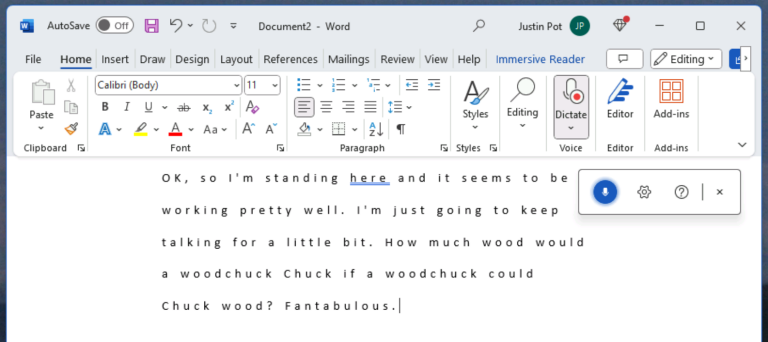
Yes, you can dictate in Microsoft Word using the built-in Dictate button on the Home tab, which uses Microsoft 365 cloud-based speech-to-text. Alternatively, you can use system-level dictation software for windows by pressing Windows Key + H to type into any Word document.
Does Windows 11 have built-in dictation software?
Yes, Windows 11 includes two primary tools. The first is Voice Access, a comprehensive tool for PC control and long-form dictation. The second is the standard Windows Dictation (Win + H), which is a lightweight tool for quick text entry. Both utilize modern Natural Language Processing for high accuracy.
Is there a free dictation?
There are several high-quality free dictation options available. Windows Voice Access and Apple Dictation are included for free with their respective operating systems. For web-based users, Google Docs Voice Typing offers highly accurate speech-to-text functionality within the browser without requiring a subscription.
What's the difference between Dictate and transcribe in Microsoft Word?
The difference between Dictate and Transcribe in Microsoft Word is that Dictate offers real-time speech-to-text while Transcribe processes pre-recorded audio files using cloud-based processing. Dictate is best for capturing thoughts as you speak, while Transcribe is designed for converting interviews or meetings into text after the recording has been completed.
Choosing Your Workflow
When selecting your dictation software for the coming year, start by looking at your hardware. If you are running an Apple M3 or a PC with a dedicated NPU, look for tools that offer offline recognition. The speed boost from local processing is transformative for your workflow.
If you are a writer, I highly recommend starting with a trial of Wispr Flow. Its ability to clean up your natural speech patterns will save you hours of editing time. However, if you are in a high-security environment like a law firm or a clinic, the investment in Dragon Professional is still the only way to guarantee the necessary data protection protocols and specialized technical jargon accuracy. Dictation is no longer a gimmick; it is the fastest way to bridge the gap between thought and text.