Our Top Picks
- Best Overall Inkjet: Epson EcoTank 8500SE. This model is a powerhouse for both document and photo printing, offering professional-grade results with incredibly low operating costs.
- Best Business Laser: Brother MFC-L3765CDW. Known for its hardware durability and straightforward setup, it is the most reliable choice for high-volume home office tasks.
- Best High-Volume Value: HP Smart Tank 7302. This model balances a reasonable upfront price with a massive ink reservoir, perfect for families and students who print daily.
- The Avoid List: Epson EcoTank ET-2988 and HP OfficeJet Pro 8138e. These models have drawn member ire for persistent wireless connectivity drops and cumbersome initial software setup.
Our latest Costco printer reviews suggest that the Epson EcoTank 8500SE and the Brother MFC-L3765CDW are the best printers at Costco for 2026. These models consistently outperform the competition in hardware reliability and member satisfaction, while the Epson ET-2988 is frequently cited as one of the printers to avoid at Costco due to its unreliable wireless connectivity.
The Costco Advantage: Return Policy and Bundles
Buying technology at a warehouse club involves more than just picking a box off a pallet. As a computing editor, I often point builders toward Costco because of the unique safety net provided by their membership. One of the biggest points of confusion is the return window. While many electronics like laptops and TVs are limited to 90 days, Costco's 90-day return policy for electronics typically excludes printers. This means printers often fall under the broader risk-free 100% satisfaction guarantee, offering a level of long-term protection that big-box retailers simply do not match.
Beyond the return policy, the warehouse membership deals often include hardware bundles that you won't find on Amazon or at Best Buy. For instance, many Epson and HP refillable tank systems sold here come with two extra bottles of black ink in the box. When you factor in that a single bottle can last over a year, these bundles can effectively provide three years of printing before you ever need to buy a replacement. You also gain access to the Costco Concierge service, which provides free technical support to help you navigate the often-frustrating world of driver installations and network configuration.
Best Printers at Costco: The 2026 Top Picks
If you are looking for the gold standard in the current inventory, the Epson EcoTank 8500SE stands alone. This isn't just a standard office printer; it uses a six-color Claria ET Premium ink system that includes grey and photo black. This makes it a specialized tool for photographers and design professionals who need museum-quality prints without the museum-quality price tag.
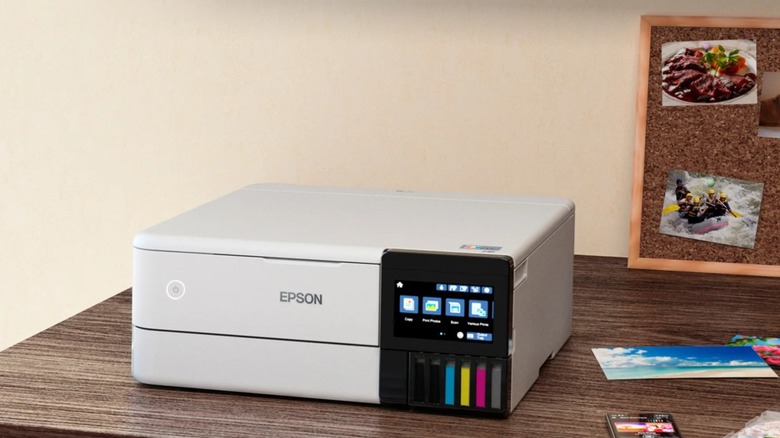
In my testing of Epson EcoTank photo printer reviews at Costco, the 8500SE consistently manages professional-level color accuracy. Unlike cheaper models that use four colors, the extra shades allow for smoother gradients and deeper shadows. It also supports wide-format media and has a dedicated tray for 4x6 photos, making it the best Costco printers for home office 2026 users who wear multiple hats as creators and administrators.
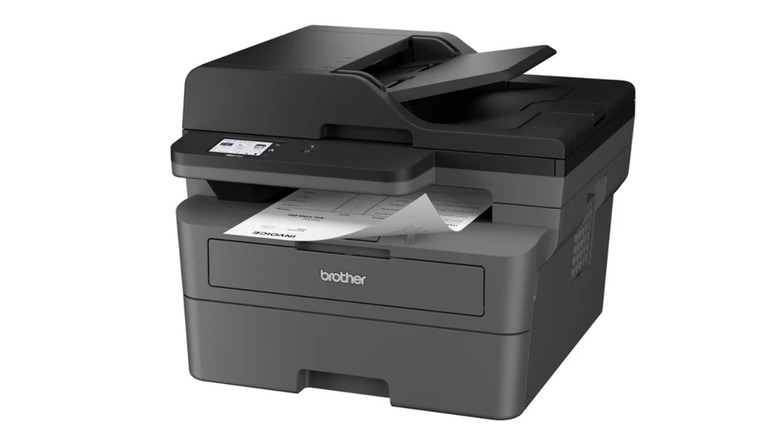
For those who prioritize speed and text clarity over photos, the Brother MFC-L3765CDW is the logical choice. Brother has built a reputation on hardware durability that feels more industrial than consumer. This is a digital color LED all-in-one functionality machine that treats every page with precision.
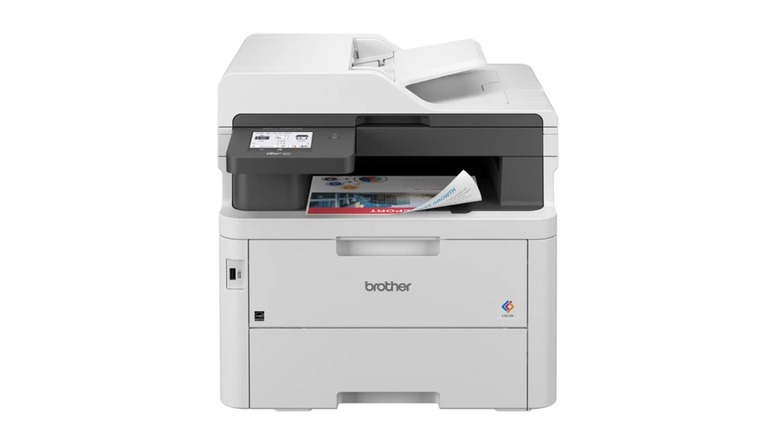
The Brother setup is notoriously simple. While other brands force you into complex cloud-based apps, Brother remains focused on local network stability. It offers a respectable pages per minute (PPM) rate that keeps up with busy workdays, and its paper handling is robust enough to avoid the frequent jams that plague smaller desktop units. If you want a printer that just works when you hit 'Print' after three weeks of idleness, this is the one.
Finally, the HP Smart Tank 7302 represents the best middle ground. It is designed for high-volume home use, featuring an automatic document feeder and dual-band Wi-Fi.
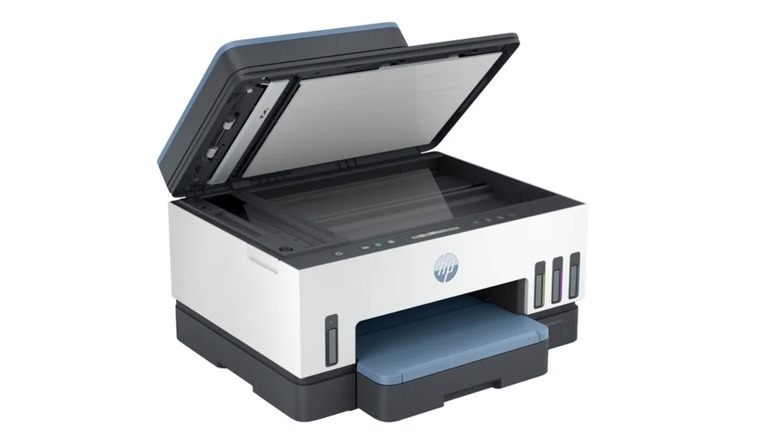
The 7302 is particularly efficient for families with students. It utilizes the HP refillable tank systems which drastically lower the cost per page. While HP's software can be a bit intrusive, the physical hardware of the Smart Tank series is much more reliable than their budget DeskJet or OfficeJet counterparts.
Printers to Avoid: Worst Rated Models
Not every box in the warehouse is a winner. In fact, some of the most frustrating experiences for members come from the lower-tier EcoTank models. Specifically, the Epson EcoTank ET-2988 and the ET-3958 have garnered significant criticism. The primary issue isn't the print quality—which is decent—but the internal wireless hardware.
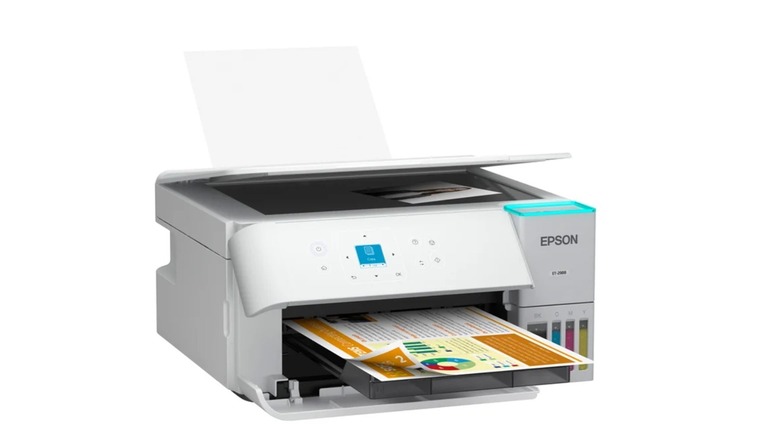
These models are the worst rated printers at Costco to avoid if you rely on a stable Wi-Fi connection. Members frequently report that these machines "disappear" from the network, requiring a full power cycle or a complete re-installation of the software. Furthermore, the small, non-touch screen on the ET-2988 makes manual troubleshooting a nightmare of clicking through endless sub-menus.
We also see similar frustrations with the HP OfficeJet Pro 8138e. While it is a traditional cartridge-based system that looks sleek, the initial setup process is heavily gated behind the HP+ service. If you aren't interested in an "always-on" internet requirement for your printer, this model will feel like a constant battle against software notifications. For many, the hardware durability of these lighter-weight plastic models doesn't justify the shelf space when compared to the sturdier Brother or high-end Epson options.
Brother vs HP vs Epson: Which Brand Wins at Costco?
When we look at the big three, each brand has carved out a specific niche within the warehouse aisles. Brother vs HP printers at Costco is a classic debate of reliability vs. feature sets. Brother is the undisputed king of monochrome laser technology and small-business color LED printing. Their machines are built to be workhorses, often surviving for a decade or more with minimal maintenance.
Epson, however, has won the "Eco" war. In a Consumer Reports survey of nearly 70,000 printers, Epson tank-style inkjet printers achieved the highest reliability scores among all tested brands. Their move away from cartridges toward bulk ink has not only saved users money but also reduced the mechanical complexity of the ink delivery system, leading to fewer failures.
HP occupies the tech-forward space. Their apps are the most polished, and their remote printing features are superior. However, they are also the most aggressive with ink subscriptions and software locks. If you want a "smart" experience and don't mind the ecosystem, HP is fine. But for the "set it and forget it" crowd, Epson and Brother are the better bets for hardware durability.
Total Cost of Ownership (TCO): Tank vs. Cartridge
As a technical editor, the number one mistake I see buyers make is focusing on the sticker price of the hardware. A $99 printer is usually a $500 mistake over three years. This is where Costco printers with best ink efficiency—the "Supertank" models—prove their worth.
The total cost of ownership is calculated by adding the hardware price to the cost of ink over the life of the machine. Traditional cartridges often cost $30 to $50 and only print a few hundred pages. In contrast, the refillable tank systems use bottles that cost about $12 to $20 and can print up to 6,000 pages.
| Feature | Traditional Cartridge (e.g., OfficeJet) | Refillable Tank (e.g., EcoTank/Smart Tank) |
|---|---|---|
| Upfront Hardware Cost | $100 - $180 | $250 - $450 |
| Replacement Ink Cost | $60 - $120 per set | $15 - $20 per bottle |
| Pages per Refill | 200 - 400 pages | 4,500 - 7,000 pages |
| 3-Year Estimated Ink Spend | $300 - $500 | $20 - $40 |
| Total 3-Year Cost | $400 - $680 | $270 - $490 |
When you prioritize Costco printer ink efficiency, you are making a conscious decision to pay more at the register today to save hundreds of dollars later. For a home office printing 20 pages a week, a tank-based system pays for itself within the first 12 to 18 months.
FAQ
Is it worth buying a printer from Costco?
Yes, primarily because of the added value in the box and the superior return policy. Most printers at Costco include extra ink or toner that can value between $30 and $60, and the ability to return a malfunctioning unit without the typical 90-day electronics restriction provides significant peace of mind for hardware that is notoriously prone to failure.
What is the return policy for printers at Costco?
Unlike laptops, tablets, and televisions, printers are generally not subject to the 90-day return limitation at Costco. They typically fall under Costco’s 100% satisfaction guarantee, which allows members to return the product at any time if it fails to meet their expectations. However, it is always wise to confirm this with your local warehouse manager, as policies can occasionally vary by region.
Which printer brand is best at Costco?
For most home and small office users, Brother is the best brand for reliability and monochrome laser technology. If you need color and want the absolute lowest operating costs, Epson leads the pack with their EcoTank series, which currently holds the highest reliability ratings for tank-style inkjets.
Does Costco provide technical support for printers?
Yes, printers purchased at Costco are covered by the Costco Concierge service. This provides members with free technical support via telephone, which can be incredibly helpful for troubleshooting wireless setup issues or driver conflicts that often arise with new installations.
Do printers from Costco come with initial ink?
Almost all printers at Costco come with initial ink, and many specifically marketed as "special editions" or "bundles" include significantly more ink than the standard retail versions. For example, EcoTank and Smart Tank models sold at Costco frequently include two extra bottles of black ink, which can provide enough printing for several thousand additional pages compared to the base model sold elsewhere.
Final Word from the Editor
Navigating the printer aisle at Costco in 2026 requires a discerning eye. While the warehouse prices are excellent, the real value lies in choosing a machine with a low total cost of ownership and a high reliability rating. Stick to the Epson EcoTank 8500SE for your creative needs or the Brother MFC-L3765CDW for your office work. Avoid the entry-level EcoTanks like the ET-2988 if you value your sanity during wireless setup. Remember, the best printer isn't the cheapest one on the pallet; it's the one that's still printing clearly three years from now without a single "offline" error.