Our Top Picks
- InfoGraph by Amoled Watch Faces: Best for power users who need health data and custom complications at a glance.
- Minimal Black v30 by Monkey’s Dream: Top choice for battery efficiency and clean aesthetics using AMOLED optimization.
- Typograph by Luka Kilic: The ultimate design for Galaxy Watch 8 Classic owners seeking high-end analog customization.
- Shiny Colorful by ZKin: Perfect for high-visibility digital layouts and users who prioritize outdoor readability.
Upgrade your wrist game with the top galaxy watch faces of 2026. Whether you need minimalist galaxy watch faces for a clean look or data-rich hubs, we've tested the best wear os watch faces for performance and style.
Samsung’s presence in the wearable market has never been stronger. Despite a challenging year for the global wearable sector, Samsung's smartwatch shipments saw a 3% growth in 2024, driven largely by the enthusiast-focused Galaxy Watch 7 and the rugged Galaxy Watch Ultra. As a mobile editor, I’ve seen hardware reach a plateau of excellence; what truly differentiates your experience now is the software on your wrist.
Choosing the right galaxy watch faces is about more than just picking a pretty background. It is about balancing information density, power consumption, and the specific capabilities of Wear OS 5 and the upcoming Wear OS 6. Modern developers are now utilizing the Watch Face Format, a standardized XML-based system that ensures your watch runs smoothly while maximizing battery life.
In this review, I have curated four top-rated apps that represent the pinnacle of samsung watch face customization in 2026. Whether you are rocking the refined Galaxy Watch 8 Classic or the outdoor-ready Ultra, these picks will transform how you interact with your device.
1. InfoGraph by Amoled Watch Faces: The Data Powerhouse
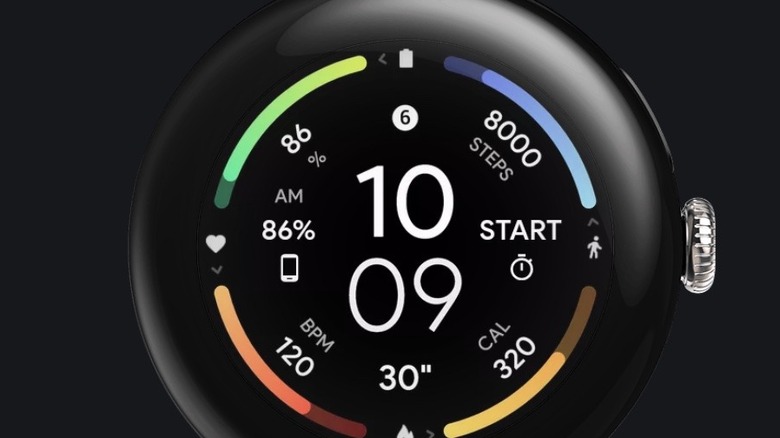
For those who treat their smartwatch as a command center, InfoGraph by Amoled Watch Faces is the gold standard. This developer has long been a favorite in the community for their adherence to the Watch Face Format, which significantly reduces the overhead on the processor.
InfoGraph is specifically designed to take advantage of the larger screen real estate on the Galaxy Watch Ultra. It offers a dense yet organized layout that can display up to nine custom complications simultaneously. This means you can track your heart rate, blood oxygen levels, step count, and upcoming calendar events without ever swiping away from the main screen.
The technical brilliance of InfoGraph lies in its health monitoring integration. By tapping into the latest APIs in Wear OS 5, the data updates in real-time with minimal impact on the battery. Users can customize the color of each individual data ring, allowing for a personalized look that stays functional. It is arguably the most powerful digital watch faces for galaxy watch ultra users who need to see everything at once.
Quick Specs
- Price: $1.49 (One-time purchase)
- Style: Data-Rich Digital
- Best For: Power users and fitness enthusiasts
- Key Feature: Support for 9+ custom complications
2. Minimal Black v30 by Monkey’s Dream: Pure Elegance
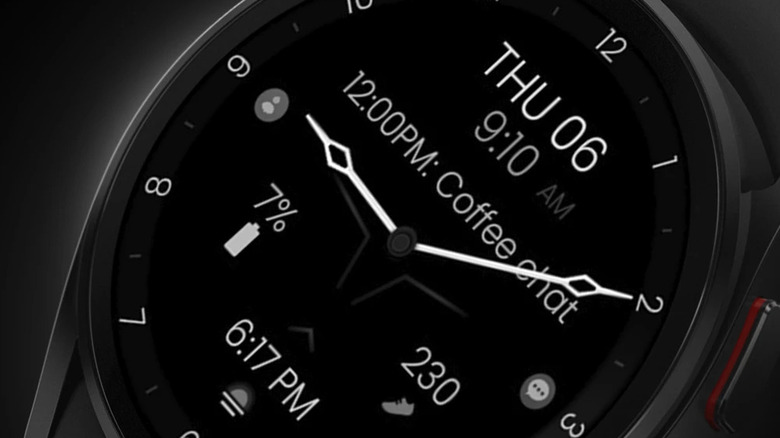
If your goal is to make your watch last through a long weekend, Minimal Black v30 by Monkey’s Dream is your best bet. This design is built on the philosophy that less is more. It leans heavily into AMOLED optimization by using true black backgrounds for over 90% of the display. On an AMOLED screen, black pixels are essentially turned off, consuming zero power.
Minimalist galaxy watch faces often sacrifice utility for style, but Minimal Black v30 strikes a perfect balance. It features a clean, high-contrast digital clock face surrounded by subtle indicators for battery and step goals. The Always-on display (AOD) mode is particularly impressive; it dims the screen to the bare essentials, ensuring that you can still tell the time without waking the entire display and draining the cell.
I have found that switching to battery efficient galaxy watch faces like this one can extend the daily life of a Galaxy Watch by several hours. It is the perfect choice for professional settings where you want your technology to look sophisticated and understated rather than distracting.
Quick Specs
- Price: $1.29
- Style: Minimalist Digital
- Best For: Extending battery life and professional environments
- Key Feature: Extreme AOD power saving
3. Typograph by Luka Kilic: The Analog Modernist
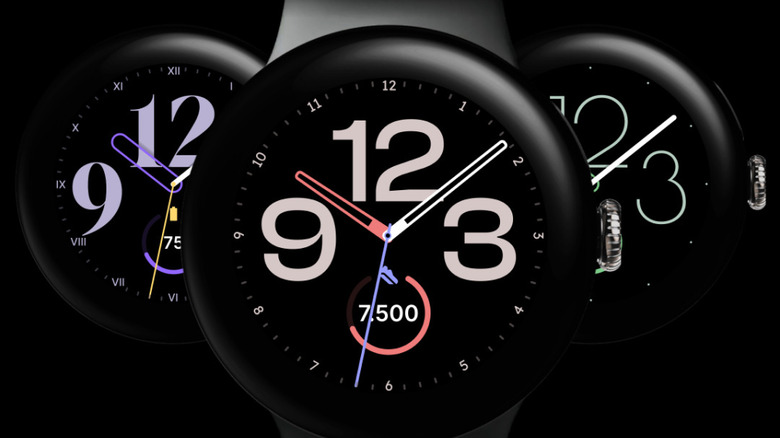
There is something timeless about an analog watch, and the Galaxy Watch 8 Classic—with its iconic rotating bezel—demands a face that respects that heritage. Typograph by Luka Kilic is a masterpiece of digital typography and classic design.
What sets Typograph apart is its insane level of samsung watch face customization. It offers over 400 color combinations and 16 different fonts, ranging from bold modern numerals to elegant, thin-stroked serif designs. This allows you to match your watch to your outfit or your mood with surgical precision.
While it looks like a traditional timepiece, it doesn't ignore the modern benefits of Wear OS. You can hide or show specific complications, such as the date or a second time zone, to keep the aesthetic as clean as possible. It is widely considered one of the top rated watch faces for galaxy watch 8 classic because it bridges the gap between a mechanical luxury watch and a high-tech wearable.
Quick Specs
- Price: $1.99
- Style: Analog Modern
- Best For: Galaxy Watch 8 Classic owners
- Key Feature: 400+ color combinations
4. Shiny Colorful by ZKin: High-Visibility Utility
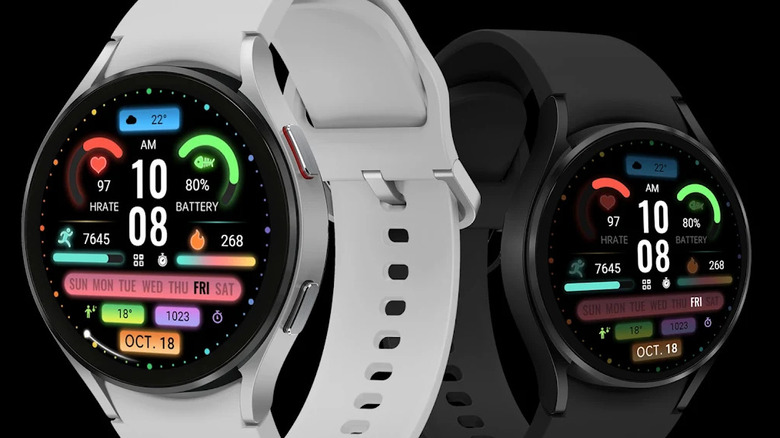
The biggest enemy of a smartwatch is a bright, sunny afternoon. Many designs wash out under direct sunlight, making it difficult to read your stats during an outdoor run. Shiny Colorful by ZKin solves this with a high-contrast, vibrant color palette designed specifically for outdoor visibility.
This face uses a bold digital layout with oversized icons for real-time weather data, heart rate, and steps. The use of neon greens, blues, and oranges against a deep black background ensures that the information "pops." It is another excellent candidate for those looking for digital watch faces for galaxy watch ultra, as that device is built for the very environments where visibility matters most.
Beyond the visuals, Shiny Colorful is highly functional. Each data point on the screen acts as a shortcut to its respective app. Tapping the weather icon opens the forecast, while tapping the heart icon takes you directly to Samsung Health. It reduces the friction of navigating the watch during high-intensity activities.
Quick Specs
- Price: $0.99
- Style: High-Contrast Digital
- Best For: Outdoor athletes and hiking
- Key Feature: High-visibility color schemes
Comparison of Top Galaxy Watch Faces
| Watch Face | Primary Style | Best Device Fit | Pricing |
|---|---|---|---|
| InfoGraph | Data-Rich | Galaxy Watch Ultra | $1.49 |
| Minimal Black v30 | Minimalist | Any Galaxy Watch | $1.29 |
| Typograph | Analog | Watch 8 Classic | $1.99 |
| Shiny Colorful | High-Visibility | Galaxy Watch Ultra | $0.99 |
Pro Tips: How to Choose Battery Efficient Galaxy Watch Faces
As you browse the Google Play Store for your next look, there are several technical factors to keep in mind to ensure you don't compromise your device's performance. The transition to Wear OS 5 has introduced several changes in how watch faces interact with the hardware.
First, always look for faces built using the Watch Face Format. This is a framework co-developed by Google and Samsung that allows the watch face to run on the lower-power co-processor rather than the main application processor. This shift is the single most important factor in reducing power consumption. Most modern third-party developers have already made this switch, but older faces from 2022 or 2023 might still use the legacy "Java/Kotlin" method, which is much harder on the battery.
Second, consider the Always-on display (AOD) design. A well-optimized face will limit the number of active pixels to less than 10-15% of the total screen area when in AOD mode. This is where AMOLED optimization shines. Avoid faces that keep large, bright images on the screen 24/7.
Finally, be aware of the "Push API" limitations found in the latest Wear OS 6 beta. Google is moving toward more restrictive data updates to save battery. Faces that allow you to customize how often data like heart rate or weather refreshes will be more "future-proof" than those that force constant updates. Knowing how to choose third party samsung watch faces involves checking the developer’s update history to ensure they are keeping up with these platform-specific changes.
FAQ
How do I change the watch face on my Galaxy Watch?
You can change the face by long-pressing the center of your current watch face. This will open a carousel of installed options. Alternatively, use the Galaxy Wearable app on your smartphone, navigate to the Watch Faces section, and select your desired design from there.
Are there free watch faces for Galaxy Watch?
Yes, the Google Play Store has thousands of free options. However, many "free" faces are either limited in customization or contain ads in the companion phone app. Premium faces, usually costing between $0.99 and $2.00, typically offer better battery optimization and more frequent updates.
Do custom watch faces drain the battery faster?
They can, but they don't have to. If a face is poorly coded or uses a lot of bright colors and animations, it will drain the battery faster than a stock face. However, faces optimized for AMOLED displays and built with the latest Watch Face Studio tools often perform just as well as the default Samsung options.
Where is the best place to find new watch faces?
The Google Play Store is the primary and safest source for Wear OS devices. You can also use "aggregator" apps like Facer or Watcher, but be aware that these often use their own engines which can be heavier on system resources compared to standalone apps from the Play Store.
How do I download watch faces from the Google Play Store?
Open the Play Store on your connected smartphone or directly on the watch. Search for the name of the watch face. When you find it, click "Install." If purchasing from your phone, ensure you select your Galaxy Watch as the target device for the installation in the dropdown menu near the "Install" button.
Are third-party watch faces safe to use?
Yes, as long as you download them from the official Google Play Store. These apps undergo security scans by Google. However, it is always a good idea to check the permissions a watch face asks for; most should only need access to sensor data and complications to function correctly.