Our Top Picks
- Opal: The most robust choice for professionals, offering unblockable focus sessions through system-level integration.
- One Sec: Best for breaking the impulse to scroll by forcing a mindful breathing exercise before any distracting app opens.
- Minimalist Phone: A game-changer for Android users that replaces dopamine-heavy icons with a clean, text-only interface.
- Freedom: The ultimate cross-platform solution for those who need to block distractions across mobile and desktop simultaneously.
- ATracker PRO: Ideal for data-driven individuals who want to track where every minute goes without strict app blocking.
The most effective screen time apps for focus in 2026 include Minimalist Phone, One Sec, and Opal. These tools utilize behavioral techniques such as friction-based delays, Monk Mode blocking, and text-based minimalist interfaces to curb doomscrolling. While Minimalist Phone simplifies the user interface to reduce visual stimulation, apps like Roots and Opal focus on deep focus blocks and gamified challenges to help users manage their digital habits and increase attention spans.
I have spent the last decade reviewing every flagship smartphone and wearable that hits the market. While I love the innovation, I am the first to admit that our devices are designed to keep us hooked. Recent research into digital habits shows that users check their phones an average of 58 times per day, a pattern of frequent interruptions that can result in a loss of up to 40% of productive time.
In 2026, the battle for our attention span has only intensified. However, a study published in the journal AIS Transactions on Human-Computer Interaction found that individuals who use smartphone applications to track and set goals for their screen time report higher levels of perceived productivity and user satisfaction. Using the right screen time apps is no longer just a trend; it is a necessary strategy for mental clarity in a hyper-connected world.
Methodology: How We Evaluated Focus Tools
To find the best apps to reduce screen time and increase focus 2026, I put over 20 different productivity focus apps through a rigorous 14-day testing period. My evaluation was not just about which app had the prettiest interface, but which one actually changed my behavior when the 3:00 PM slump hit and I instinctively reached for my phone.
I focused on three core metrics: Effectiveness, Ease of Use, and Value. Specifically, I looked at how well these apps utilize the Screen Time API and system-level permissions to prevent bypass. Many apps are too easy to click out of; I wanted tools that acted as a willpower sidekick. I also analyzed the quality of usage reports to see if they provided actionable insights or just a depressing graph of my failures.
1. One Sec: The Power of Intentional Friction
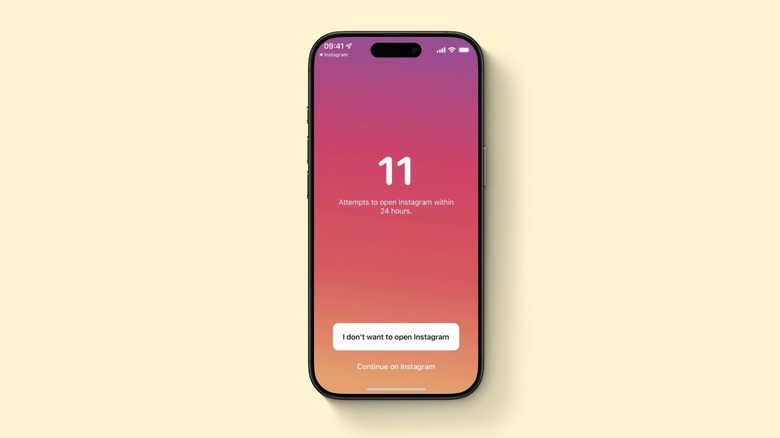
One Sec is arguably the most unique entry in the world of phone detox apps. Instead of a hard block that often triggers a feeling of restriction, it uses behavioral economics to introduce intentional delays. When you tap on a distracting app, One Sec intercepts the request and forces you to take a deep breath for several seconds.
Who it is best for
This is the best option for users struggling with impulse control. If you find yourself opening Instagram without even realizing you picked up your phone, the friction based apps to break social media habits like One Sec are designed specifically for you.
Pros and Cons
- Pros: Effectively breaks the dopamine loop; simple setup; high long-term success rate.
- Cons: Can be annoying when you actually need to use an app for work; requires Shortcut setup on iOS.
The beauty of this approach is that it targets the root of the problem: the subconscious habit. By forcing a mindful pause, it gives your prefrontal cortex a chance to catch up and ask, Do I actually want to do this? In my testing, this friction based intervention led to a significant reduction in mindless checks within the first three days. When comparing opal vs one sec for screen time management, One Sec is much more focused on that initial moment of impulse rather than long-duration blocking.
2. Minimalist Phone: Redesigning the Android Experience
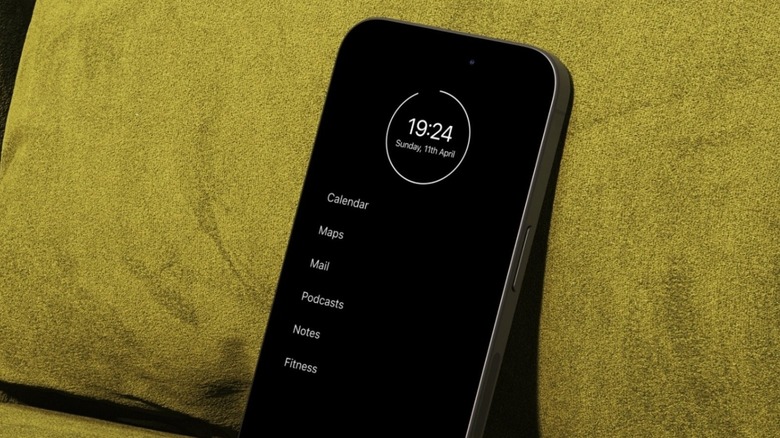
For Android users, Minimalist Phone offers a radical departure from the standard mobile experience. It is not just an app; it is a launcher that completely replaces your home screen. It eliminates colorful, high-contrast icons that act as visual triggers and replaces them with a clean, monochrome, text-based list.
Who it is best for
This is the gold standard for minimalist launcher apps for android productivity. It is perfect for people who feel overwhelmed by their phone's UI and want to turn their device into a tool rather than a toy.
Pros and Cons
- Pros: Removes visual dopamine triggers; built-in notification filter; includes in-app time reminders.
- Cons: Android only; requires a complete change in how you navigate your phone.
By simplifying the UI, Minimalist Phone extends your attention span by reducing the constant noise of notifications and bright badges. It also features a hide app function, which is great for tucking away those apps that you cannot delete but do not want to see. This level of Digital minimalism is incredibly effective for reclaiming time during the workday.
3. Opal: The Gold Standard for Deep Focus
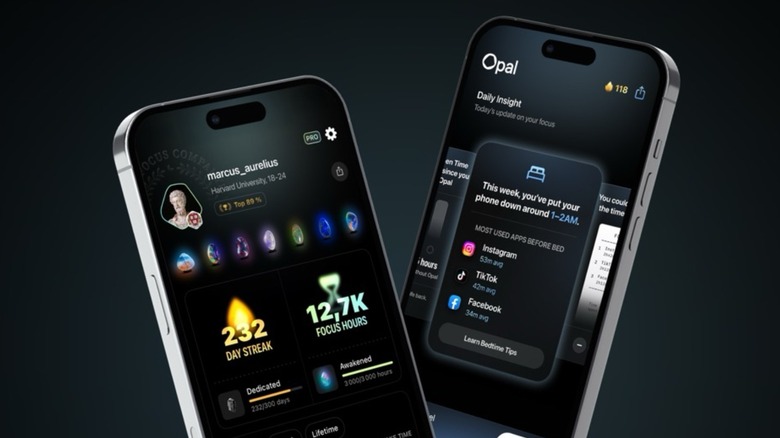
Opal has quickly become the top rated iphone screen time apps for focus, though its Android version is catching up fast. It uses a local VPN or system-level profiles to create a barrier that is almost impossible to bypass. When you are in a Deep Focus session, the distracting apps literally disappear or become unresponsive.
Who it is best for
Opal is the best free app for screen time enthusiasts who eventually upgrade to the premium version for professional-grade blocking. It is the best choice for students and professionals who need to enter a state of deep work without any possibility of interruption.
Pros and Cons
- Pros: Extremely difficult to bypass; offers whitelisting for essential apps; excellent cross-platform synchronization.
- Cons: Subscription price is higher than competitors ($59.99/year); requires deeper system permissions.
The most powerful feature of Opal is its automated schedules. You can set it to block social media from 9:00 AM to 5:00 PM every weekday, and it will handle the rest. When debating opal vs one sec for screen time management, Opal is the winner for those who need a scorched earth approach to distractions. It effectively manages your digital habits by making the choice for you before your willpower fades.
4. Freedom: Cross-Platform Discipline for All Devices
One of the biggest hurdles to digital wellbeing is the fact that we jump from our phones to our laptops. If you block Reddit on your iPhone, you might just open it on your MacBook. Freedom solves this by offering cross-platform focus across iOS, Android, Mac, Windows, and even Chrome.
Who it is best for
It is the premier choice for cross platform screen time apps for mac and mobile users. If your work requires you to be on multiple devices, Freedom ensures your discipline follows you everywhere.
Pros and Cons
- Pros: Blocks websites and apps across all devices simultaneously; Locked Mode prevents session ending; scheduled sessions.
- Cons: UI feels a bit dated compared to Opal; setup can be complex across multiple OS types.
Freedom’s Locked Mode is its secret weapon. Once you start a session, you cannot disable the block or delete the app to get around it. This creates a forced environment for deep work that is essential for writers, developers, and researchers.
5. ATracker PRO: Data-Driven Awareness
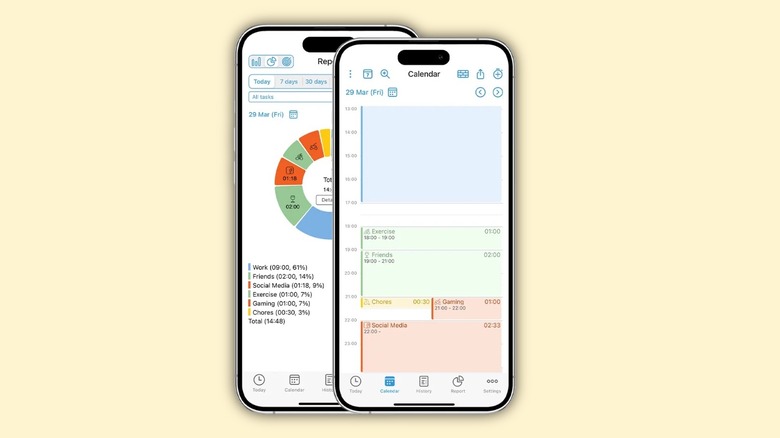
Not everyone needs a digital cage. For some, simply seeing the cold, hard data is enough to spark change. ATracker PRO is a screen time tracker apps for professional focus that focuses on time auditing rather than active blocking. It requires you to start a timer for your tasks, which naturally creates a sense of accountability.
Who it is best for
It is perfect for those who want to improve their sleep hygiene and general productivity by understanding their time allocation without feeling restricted by an app blocker.
Pros and Cons
- Pros: One-time payment ($4.99); highly customizable categories; beautiful data visualizations.
- Cons: Requires manual input for the best results; does not actively block apps.
ATracker PRO helps users understand where their time is actually spent, leading to more conscious decision-making. By reviewing your usage reports at the end of the week, you can identify patterns—like spending two hours on TikTok before bed—and manually adjust your routines for better mental clarity.
Comparison Table: Choosing Your Digital Guard
| App | Primary Method | Bypass Prevention | Platform | Best For |
|---|---|---|---|---|
| One Sec | Friction/Delays | Medium | iOS/Android | Impulse Control |
| Minimalist Phone | UI Redesign | High | Android | Digital Minimalism |
| Opal | Hard Blocking | Very High | iOS/Android | Deep Work |
| Freedom | Ecosystem Block | High | All | Multi-device users |
| ATracker PRO | Tracking/Data | N/A | iOS/Android | Time Auditing |
FAQ
What is the best free app for screen time?
Most screen time apps offer a free tier with basic features, but One Sec is often considered the most effective free-to-start option. It allows you to use its core friction mechanic on one app for free, which is often enough to break your worst habit. For Android users, the basic version of Minimalist Phone provides excellent value without a subscription.
How do screen time apps help reduce phone usage?
These apps work by targeting the psychological triggers of phone addiction. Some use behavioral economics to introduce friction, making you wait before an app opens. Others use UI simplification to remove the visual rewards of colorful icons. By providing detailed usage reports and setting strict boundaries, these tools force you to be more intentional with your device.
Which screen time apps work on both iOS and Android?
Opal, One Sec, Freedom, and ATracker PRO all offer versions for both major mobile platforms. However, the functionality can vary slightly because Apple and Google provide different levels of access to their respective Screen Time API and system-level permissions.
What are the most effective features of screen time apps?
The most effective features include friction based delays (like the deep breath in One Sec), unblockable focus modes (like Opal's Deep Focus), and cross-platform synchronization (like Freedom). Automated scheduling and notification management are also critical for maintaining long-term digital wellbeing.
Do screen time apps impact battery life?
Most modern screen time apps have a negligible impact on battery life. Apps like Opal use a local VPN, which may show up in your battery settings but actually consumes very little power. However, apps that constantly track your location or use background data heavily can have a minor impact. The benefit of reclaimed focus usually far outweighs the tiny cost in battery.
Finding Your Focus in a Distracted World
Reclaiming your focus in 2026 isn't about moving to a cabin in the woods; it’s about using the right screen time apps to build a healthier relationship with the technology in your pocket. Whether you need the gentle nudge of One Sec, the total UI overhaul of Minimalist Phone, or the iron-clad discipline of Opal, there is a tool designed to match your specific struggles.
If you are just starting your journey toward digital minimalism, I recommend beginning with a 7-day digital detox. Pick one app from this list—whichever matches your persona best—and commit to its rules for one week. You might be surprised at how much mental clarity returns when you stop letting your phone dictate your attention span.