Quick Facts
- Top Plug-and-Play Pick: Magic Box 3.0 (Snapdragon 8-core)
- Best for Luxury Vehicles: GROM VLine (Lexus/Infiniti focus)
- Best for Enthusiasts: Raspberry Pi with OpenAuto Pro
- Primary Benefit: Standalone Android operating system and video streaming
- Market Insight: 94% of surveyed consumers would consider switching to native systems if features improve.
- Compatibility: Works via existing wired CarPlay USB ports or through CAN bus integration.
Apple CarPlay alternatives like Android AI boxes and standalone hardware modules provide features standard mirroring lacks, such as Netflix streaming and OBD-II telemetry. The best Apple CarPlay alternatives include Android AI boxes for streaming video, integrated hardware modules like Grom VLine for luxury cars, and DIY Raspberry Pi setups for total customization.
If you have spent any time behind the wheel of a modern vehicle, you know the familiar layout of Apple CarPlay. It is safe, predictable, and incredibly restrictive. While it handles maps and music well, it locks you out of a world of high-performance apps and multimedia potential. As of April 2023, 98% of new cars supported either Apple CarPlay or Android Auto, yet drivers are increasingly looking for ways to break out of the walled garden. Whether you want to watch YouTube during a charging stop or see real-time engine telemetry, the standard phone-mirroring interface simply cannot do it.
1. The Power of Android AI Boxes: Ultimate Multimedia Freedom
For most drivers, the easiest path to an upgrade is the Android AI box for cars. These devices are roughly the size of a deck of cards and plug directly into the wired CarPlay USB port of your vehicle. Instead of your car seeing a phone, it sees a computer. The device intercepts the handshake signal to launch a standalone operating system on your factory screen.
The primary appeal here is the lack of restriction. Because these boxes run a full version of Android, you have Google Play Store access. This means you can download apps that Apple and Google usually block from car screens, making it the best Android AI box for Netflix and YouTube. For a smooth experience, I always recommend looking for hardware that packs at least 8GB RAM and a modern Qualcomm Snapdragon SoC. Without these specs, the UI can feel sluggish, especially when multitasking between navigation and media.
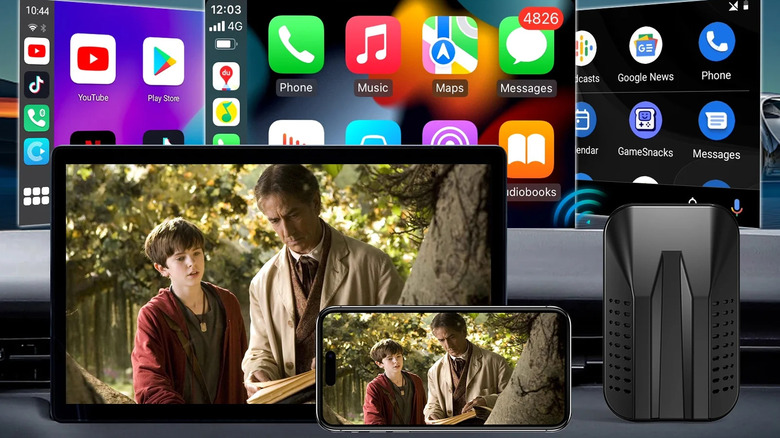
Many of these devices also function as wireless CarPlay AI adapters with built-in assistants, allowing you to use your iPhone wirelessly while still having the option to switch to the Android interface for video. However, with great power comes responsibility.
Safety Warning: Local Regulations Most regions have strict laws regarding video playback while a vehicle is in motion. For example, PA Senate Bill 37 and similar legislation across various states prohibit the use of interactive wireless devices and video displays within the driver's view while driving. Always use multimedia features responsibly and only when parked.
| Feature | Recommended Specification |
|---|---|
| Processor | Qualcomm Snapdragon 665 or higher |
| Memory | 8GB LPDDR4 RAM |
| Storage | 64GB / 128GB eMMC |
| Connectivity | 4G LTE SIM Slot + Dual-Band Wi-Fi |
| Operating System | Android 12 or 13 |
2. Integrated Modules: Seamless Tech for Luxury Vehicles
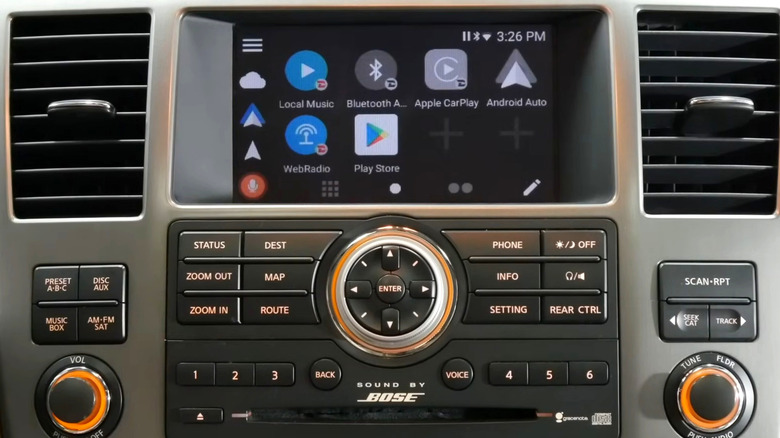
If you drive a Lexus, Infiniti, or older BMW, you might find that your factory screen is great, but the software feels like it belongs in 2010. For these scenarios, integrated hardware modules like the Grom VLine or NavTool are the gold standard. Unlike a USB dongle, these modules connect directly to the back of your factory head unit.
The major advantage here is OEM interface retention. You can switch between the factory Lexus menu and the new Android interface with a long press of a steering wheel button. These systems are designed for retaining factory steering wheel controls with Android units, ensuring that your volume knobs and track seekers work exactly as intended.
While a factory infotainment upgrade from a dealership could cost you between $1,500 and $3,000, these modules usually retail for around $400 to $600. When comparing Grom VLine vs NavTool for luxury vehicle integration, Grom often wins on community support and frequent firmware updates, making it a favorite for Apple CarPlay alternatives for older cars that still have plenty of life left in them.
3. DIY Car Computer: The Raspberry Pi Revolution
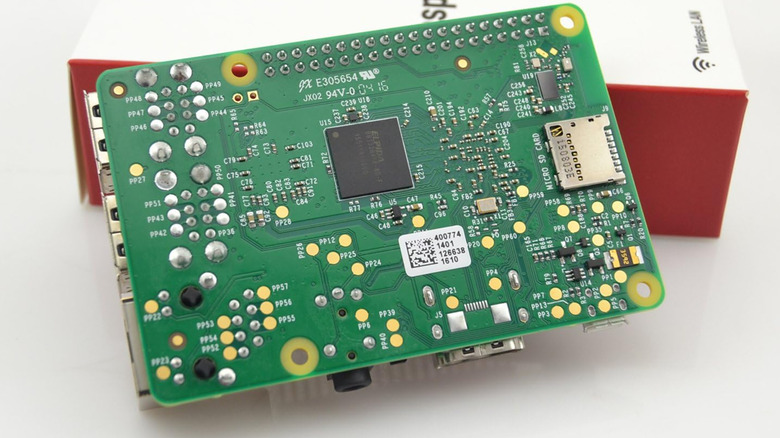
For the tech enthusiasts who want total control, DIY car infotainment systems built on the Raspberry Pi platform offer a level of customization that no commercial product can match. Using software like OpenAuto Pro, you can create a digital cockpit upgrade that rivals high-end luxury systems.
The hardware core of these DIY car computer projects with Raspberry Pi involves a Pi 4 or Pi 5, a high-quality touchscreen, and a power management board to handle the car's fluctuating voltage. The real magic happens with CAN bus integration. By connecting the Pi to your car's data network, you can pull real-time engine telemetry directly onto your dashboard.
- Custom Dashboards: Create digital gauges for boost pressure, oil temperature, and battery health.
- OBD-II Diagnostics: Using Android car stereos for OBD-II diagnostics allows you to read and clear engine codes without a separate scanner.
- Peripherals: Connect high-end USB DACs for audiophile-grade sound quality that far exceeds standard Bluetooth.
While the learning curve is steep, the result is a one-of-a-kind system that can even include things like custom start-up animations and integrated reverse cameras.
4. Aftermarket Head Units: Breathing Life into Older Cars
Sometimes, the best way to move forward is to replace the old hardware entirely. For older economy cars that lack a screen altogether, aftermarket Android head units are the most effective Apple CarPlay alternatives for older cars. These units replace the double-DIN or single-DIN radio in your dashboard with a large, modern tablet interface.
One of the biggest benefits of a dedicated hardware replacement is the reduction in latency. While wireless mirroring often has a lag of around 0.8 seconds, a direct-wired connection or a high-quality Android unit can bring that down to 0.2 seconds. Most of these units come with plug-and-play harnesses, meaning you do not have to cut any of your car's original wiring to get them installed.
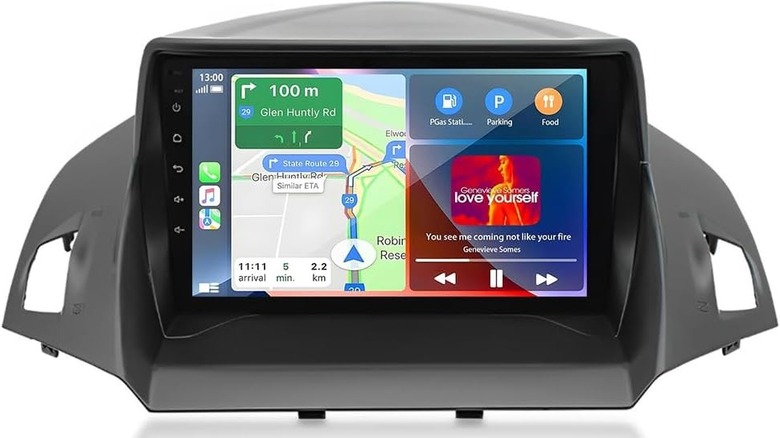
These units are particularly useful for aftermarket Android head units for economy car upgrades because they often include built-in amplifiers that actually improve the sound quality of your factory speakers. They serve as a complete multimedia streaming capability hub, often including physical SD card slots and multiple USB inputs for offline media storage.
5. Native OS & Portable Screens: The Non-Phone Mirroring Path
The automotive industry is currently in a state of transition. General Motors plans to phase out Apple CarPlay and Android Auto across its entire vehicle lineup by 2028, moving toward a native, Google-powered platform. This shift highlights a growing trend: proprietary systems that work so well you do not need your phone.
Among the leading Apple CarPlay alternatives in this space, Tesla's built-in infotainment system and BMW's iDrive have achieved high owner satisfaction ratings of 86% and 80%, respectively. These systems offer deep vehicle integration that mirroring apps can never touch, such as pre-conditioning the battery for charging or adjusting the suspension based on GPS data.
If you have a newer vehicle that lacks native support or CarPlay, portable screens like those from VOXBASS offer a zero-installation alternative. These screens mount to your dashboard or windshield and provide a dedicated interface for navigation and media without needing to touch your car's existing electronics. It is a simple way to add a modern interface to a classic car or a 2025 model that has opted for a native-only OS.
FAQ
What are the best alternatives to Apple CarPlay?
The best options include Android AI boxes for plug-and-play multimedia, integrated modules like Grom VLine for luxury cars, and full aftermarket Android head units for older vehicles. For hobbyists, a Raspberry Pi running OpenAuto Pro is a powerful DIY alternative.
Can I mirror my phone screen to my car without CarPlay?
Yes, using an Android AI box or specific aftermarket head units allows for screen mirroring via apps like AirPlay or Miracast. These devices bypass the standard CarPlay restrictions to show exactly what is on your phone screen.
Do I need a specific hardware upgrade to use CarPlay alternatives?
It depends on the method. AI boxes only require a car with an existing wired CarPlay USB port. Integrated modules and head units require physical installation behind the dashboard, while DIY projects require a Raspberry Pi and related components.
Are there third-party apps that replace the CarPlay interface?
Apps like CarWebGuru or Agama Car Launcher can be installed on Android-based head units or AI boxes. They provide a custom, car-friendly UI that replaces the stock look and offers more widgets for speed, weather, and music.
How can I use navigation apps on my car screen without CarPlay?
By using a standalone Android system (AI box or head unit), you can download Google Maps, Waze, or HereWeGo directly from the Play Store. These apps will run natively on the car's hardware, often using a built-in GPS antenna for better accuracy than a phone.