Quick Facts
- Primary Function: Tracking heart rate and SpO2 via Photoplethysmography (PPG).
- Green Light: Measures heart rate and remains active during workouts and breathing sessions.
- Red Light: Measures blood oxygen saturation (available on Series 6 and later models).
- Accuracy: Heart rate shows a 99% correlation with chest straps; SpO2 is within 1% of medical grade at rest.
- Limitations: Not a diagnostic replacement; 14% of healthy readings may show artifacts under 95%.
- Availability: New Series 9 and Ultra 2 models sold in the United States after January 2024 have blood oxygen monitoring disabled.
Have you ever noticed a red or green glow coming from your Apple Watch? These represent the core of the Apple Watch health sensors. While the green light tracks your heart rate, the red light is for blood oxygen monitoring. Understanding these PPG sensors is key to tracking your long-term wellness and detecting trends like sleep apnea or respiratory changes.
Apple Watch health sensors use photoplethysmography (PPG) to track vital signs through the skin. A green light indicates the sensor is measuring your heart rate, while a red light means the device is checking blood oxygen saturation (SpO2). These sensors emit light into the wrist and measure the reflection to estimate how much oxygen your hemoglobin is carrying.
Red vs. Green: Decoding the Glowing Lights
If you flip your Apple Watch over, you will likely see a sophisticated array of LEDs and photodiodes. Most users are familiar with the green light, which has been a staple of the device since the original model. This green LED works by flashing hundreds of times per second to calculate the number of times your heart beats each minute. It is essentially looking for the volume of blood flowing through your wrist; because blood is red, it reflects red light and absorbs green light. When your heart beats, the blood flow in your wrist—and the green light absorption—is greater. Between beats, it is less.
The red light, however, is a more recent addition, first appearing on the Series 6. Unlike the heart rate sensor, which relies solely on green LEDs, the blood oxygen sensor uses a combination of red and infrared LEDs along with the four clusters of photodiodes. When the red light is active, it is specifically measuring your oxygen saturation, or the percentage of oxygen your red blood cells are carrying from your lungs to the rest of your body.
It is important to note that while all modern Apple Watches feature heart rate tracking, the red light functionality is exclusive to the Series 6, 7, 8, 9, 10, and Ultra models. Furthermore, due to a patent dispute with Masimo, Apple was forced to disable the blood oxygen monitoring feature on all new Series 9 and Ultra 2 models sold in the United States beginning in January 2024. If you purchased one of these specific models in the US recently, your device may have the hardware, but the software prevents the red light from activating.
The Technology: How Apple Watch PPG Sensors Work
To truly appreciate what is happening on your wrist, we have to look at the physics of Photoplethysmography, or PPG. Most medical-grade pulse oximeters used in hospitals are transmissive. You know the ones—the plastic clips they put on your fingertip. They shine light through your finger to a sensor on the other side. However, a watch cannot shine light through your wrist; it has to use reflectance pulse oximetry.
The Apple Watch PPG sensors shine light into the skin and then measure how much of that light is reflected back to the photodiodes. This is a complex engineering feat because the sensor must filter out the "noise" caused by skin pigment, wrist hair, and even the movement of your arm. The back of the watch features a circular crystal with four LED clusters and four photodiodes.
The heart rate monitoring system uses the green light because it provides the highest signal-to-noise ratio for detecting the pulse. Oxygen saturation monitoring is more complicated. Hemoglobin—the protein in your blood that carries oxygen—changes its color depending on how much oxygen it holds. Oxygenated hemoglobin absorbs more infrared light and allows more red light to pass through, while deoxygenated hemoglobin absorbs more red light and allows more infrared light to pass through. By comparing the ratios of reflected red and infrared light, the Apple Watch can calculate your SpO2 percentage.
Accuracy Benchmarks: Heart Rate vs. Blood Oxygen
For many users, the primary question is whether these wearable biometrics are actually reliable. As someone who has tracked thousands of miles of runs and monitored my own sleep cycles, I have seen the data evolve significantly. The heart rate sensor is remarkably mature. A 2026 meta-analysis of 82 studies involving over 430,000 participants found that the Apple Watch heart rate sensor has a mean bias of -0.27 beats per minute. This demonstrates high accuracy across resting conditions, rivaling medical-grade chest straps.
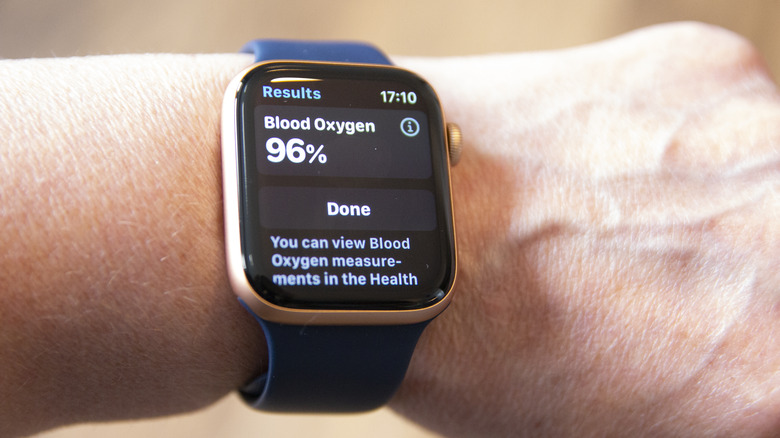
Blood oxygen monitoring is slightly more sensitive but still impressively consistent. Clinical research has shown the Apple Watch blood oxygen sensor to be highly reliable, with an average absolute difference of less than 1% SpO2 when compared to medical-grade pulse oximeter sensors. This level of precision makes it an excellent tool for identifying long-term trends rather than just isolated snapshots.
However, interpreting apple watch heart rate and blood oxygen data requires understanding the context of the reading. While heart rate tracking is resilient even during intense movement, blood oxygen measurements require you to be very still. In fact, if you are moving or the watch is too loose, the sensor may fail to get a reading entirely. It is also common to see occasional low readings—between 92% and 95%—which are often artifacts of poor fit or arm position rather than a sign of a respiratory issue. If you are a healthy individual, your baseline should typically sit between 95% and 100%.
Practical Optimization: Fit and the Vitals App
To get the best results from your Apple Watch health sensors, the physical placement of the device is your most important variable. I always recommend wearing the watch snugly—not tight enough to cut off circulation, but tight enough that the sensor remains in constant contact with your skin. For the most accurate readings, place the watch about two finger-widths above your wrist bone. This moves the sensor away from the bone and onto a flatter, more vascular area of the arm.
If you are struggling with Apple Watch blood oxygen sensor placement for best results, try resting your arm on a table or in your lap during the 15-second countdown. Approximately 36% of manual blood oxygen checks can fail if there is too much movement.
The introduction of the Vitals app in watchOS 11 has changed how we use this data. Instead of just looking at a single heart rate or SpO2 number, the Vitals app looks at your data during sleep to establish a personal baseline. It requires seven nights of sleep data to begin showing you "outlier" notifications. This is incredibly useful for apple watch health sensors for chronic disease monitoring, as it can highlight when your body is under stress from illness, alcohol, or even changes in altitude.
For those using these tools for monitoring trends related to sleep apnea, COPD, or heart failure, setting up vitals app notifications for apple watch sensors provides an early warning system. While the watch cannot diagnose these conditions, seeing a consistent dip in your overnight blood oxygen baseline is a clear signal that it is time to consult a medical professional.

Pro Tip: If you find the glowing lights distracting at night, you can manage them in the settings. However, keep in mind that disabling the Blood Oxygen or Heart Rate sensors in the Apple Watch app will prevent the device from tracking your sleep stages and Vitals baseline.
FAQ
How accurate are Apple Watch heart rate sensors?
The sensors are exceptionally accurate for a consumer wearable. Clinical meta-analyses show a mean bias of less than one beat per minute compared to medical-grade equipment. It is most accurate at rest and during steady-state cardio, though it can slightly lag during high-intensity interval training (HIIT).
How does the blood oxygen sensor work?
It uses reflectance pulse oximetry. Red and infrared LEDs shine light into the blood vessels of your wrist. By measuring how much light is reflected back, the watch calculates the color of your blood, which indicates how much oxygen is being carried by your hemoglobin.
Can the Apple Watch track sleep apnea or breathing issues?
While the Apple Watch has a specific "Sleep Apnea Notifications" feature that looks for breathing disturbances using the accelerometer, the blood oxygen sensor is also a key indicator. Frequent dips in SpO2 during the night can be a sign of breathing interruptions, though you should always seek a formal sleep study for a diagnosis.
Which Apple Watch model has the most health tracking sensors?
The Apple Watch Series 10 and Apple Watch Ultra 2 contain the full suite, including heart rate, blood oxygen (outside the US), ECG, skin temperature, and the depth gauge. For the most comprehensive health data, these flagship models are the gold standard.
Are Apple Watch health readings reliable for medical diagnosis?
No. While Apple Watch health sensors are highly accurate for wellness tracking and trend monitoring, they are not intended to replace medical-grade diagnostic equipment. They are designed to provide you with data to share with your doctor, not to serve as a standalone medical device.
Keep an eye on your Health app to see how your daily habits affect your heart and respiratory health. If you consistently find that your vitals are falling outside your established baseline, it is always best to check in with a healthcare provider to discuss what your Apple Watch might be seeing.