Quick Facts
- The Gold Standard: Keepa maintains a database of more than 6 billion products across 11 international marketplaces.
- Best for Simplicity: Camelcamelcamel offers a streamlined experience with reliable price drop alerts and no cost.
- Best for Automated Savings: PayPal Honey saves shoppers an average of $17.45 per successful coupon application.
- The AI Frontier: HARPA AI allows for custom price monitoring on any website, including Amazon, using local data processing.
- Mobile Solution: PriceLasso bridges the gap for iOS and Android users who need cross-platform price tracking.
- Market Insight: Research shows that consumers using extensions spend approximately 185% more on average than those without them.
The best Amazon price tracker for most users is Keepa due to its massive 6-billion product database and granular data visualization. For those seeking a free, simpler alternative, Camelcamelcamel remains the top choice for reliable price drop alerts on Amazon via browser extensions like Camelizer.
Tracking price volatility is essential in 2026 as algorithmic pricing becomes the norm for online retailers. While Camelizer is a classic tool that many shoppers start with, more advanced options like Keepa and HARPA AI offer deeper data for the best Amazon price tracker experience. With price fluctuations occurring multiple times a day on popular items, simply checking a product once is no longer enough to ensure you are getting a fair deal.
The Heavyweights: Camelcamelcamel vs Keepa for Price Tracking
When you enter the world of serious deal hunting, the conversation almost always starts with the rivalry between Camelcamelcamel and Keepa. These two tools have defined the category for years, but they cater to very different types of shoppers. If you are trying to decide on an Amazon price history extension, you first need to determine if you are a casual buyer or a power user who wants every available metric.
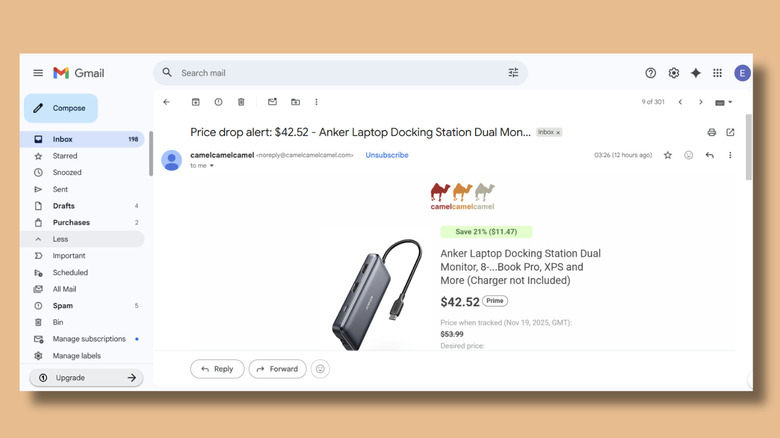
Camelcamelcamel, often referred to by its browser extension name Camelizer, is the accessible gateway to price tracking. It focuses on the essentials: price history charts and email notifications. You can see the highest, lowest, and average price of an item since the tool started tracking it. It is entirely free and supported by affiliate links, making it a low-friction choice for someone who just wants to know if that "Black Friday Deal" is actually an all-time low price.
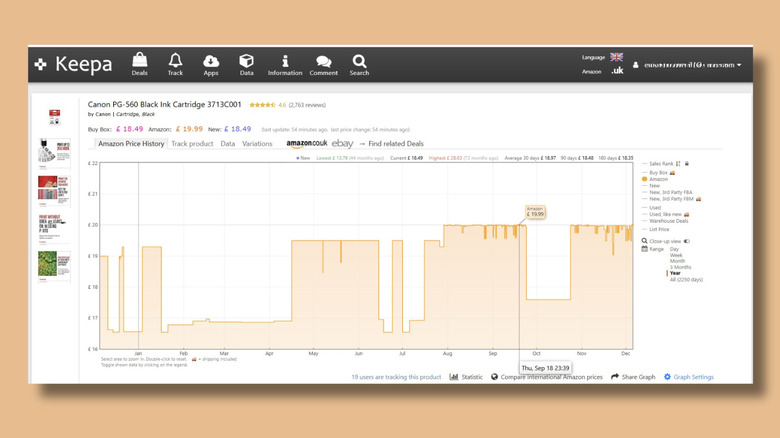
On the other end of the spectrum is Keepa. While Camelcamelcamel tracks millions of products, the Keepa browser extension maintains a database of more than 6 billion products and is utilized by over 4 million users to track Amazon price histories. Keepa is significantly more robust, offering data on Sales Rank, Buy Box history, and even Warehouse deals. While the basic charts are free, Keepa uses a freemium model where more advanced features require a monthly subscription of roughly 19 Euros.
| Feature | Camelcamelcamel | Keepa |
|---|---|---|
| Product Database | Millions | 6 Billion+ |
| International Support | Limited (8 locales) | Extensive (11+ locales) |
| Cost | Free | Free / Premium Tier |
| Data Visualization | Basic price charts | Multi-layered historical data |
| Alerts | Email, RSS | Email, Push, Webhook, RSS |
| Browser Support | Chrome, Firefox, Safari | All major browsers |
For a standard user, the choice in camelcamelcamel vs keepa often comes down to the interface. Keepa embeds its charts directly onto the Amazon product page, which is incredibly convenient but can feel cluttered to the uninitiated. Camelizer requires a click on the extension icon to reveal the data. If you are comparing camelcamelcamel vs keepa for price tracking performance, Keepa wins on data update frequency and global price parity, which is crucial for identifying if an item is cheaper on Amazon UK or Germany versus the US store.

Top Free Alternatives to Camelcamelcamel for Casual Shoppers
If the technical density of Keepa feels like overkill and Camelcamelcamel feels a bit dated, there is a middle ground of modern extensions designed for the casual shopper. These tools often bundle price tracking with other money-saving features like coupon automation and rewards programs.
PayPal Honey is perhaps the most famous alternative. While many know it for its "find coupons" button at checkout, its Droplist feature is a powerful way to set price drop alerts Amazon. Honey tracks the price of items in your list and notifies you when they hit a target price. Internal data indicates that Honey saves shoppers an average of $17.45 per successful coupon application and has provided over $3.5 billion in total savings since its launch. It is an excellent choice for those who shop across multiple retailers, not just Amazon.
Another strong contender is Slickdeals. Known primarily as a community-driven deal site, their browser extension brings the power of millions of deal-hunters to your browser. It provides price history but shines brightest by showing you if a product has ever been featured as a "Frontpage Deal," which is a high bar for value.
For those who want a more aesthetic experience, Karma (formerly Shoptagr) is a favorite. It allows you to save products into organized lists and receive push notifications for price drops and stock availability updates. It is particularly popular in the fashion and electronics space where stock levels are as important as the price itself. These free alternatives to camelcamelcamel for Amazon offer a more "lifestyle" approach to saving money.
The 2026 Shift: Using AI Browser Extensions for Amazon Price Monitoring
The landscape of price tracking changed significantly with the integration of artificial intelligence. Traditional trackers rely on central databases that may only update once or twice a day. Modern AI-driven tools like HARPA AI take a different approach by using your browser to monitor the page in real-time.
Using AI browser extensions for Amazon price monitoring allows for a level of customization that was previously impossible. You can tell an AI tool to monitor a specific part of a webpage—not just the price field. This is particularly useful for tracking Amazon Warehouse listings, where the price might not change, but a "Like New" item suddenly becomes available.
HARPA AI runs locally in your browser, which means it doesn't need to ping a central server every time you want an update. You can set it to "watch" a page every 15 minutes and trigger an alert if the text on the screen changes. This is the ultimate weapon for snagging limited-time lightning deals or high-demand tech releases. However, users should be mindful of extension permissions. Because these tools "read" the webpage to find data, always ensure you are using reputable AI tools with clear privacy policies.
Pro Tip: When setting up price drop alerts, don't just set your target at the all-time low. Check the seasonal trends. Many products have a "cyclical low" every 90 days. Setting your alert slightly above the all-time low can help you catch the downward trend before the item sells out.
How to Track Amazon Price Drops on iPhone and Mobile Browsers
One of the biggest frustrations for deal hunters is that most powerful browser extensions do not work on mobile versions of Chrome or Safari. While the Amazon app has some built-in notification features, they are often delayed or designed to encourage spending rather than saving.
To solve the mobile gap, many users turn to PriceLasso or dedicated apps that sync with their desktop accounts. However, the most reliable method for how to track Amazon price drops on iPhone remains setting up Amazon price drop alerts via email. Both Keepa and Camelcamelcamel allow you to create alerts on your desktop which then get pushed to your phone via email or Telegram.
Another effective strategy for mobile users is to use the "Share" sheet in Safari. By using a shortcut or a dedicated price tracking app, you can "share" an Amazon product link directly to the tracker, which then monitors the ASIN identifier and notifies you via push notifications when the price hits your threshold.
Research into shopping habits reveals that shoppers with these tools are highly engaged; consumers who use e-commerce browser extensions spend approximately 185% more on average than those without them. This suggests that the tools don't just save money—they give shoppers the confidence to buy when the data proves the price is right.
FAQ
What is the best free Amazon price tracker?
Camelcamelcamel is widely considered the best completely free option because it provides comprehensive price history and email alerts without a subscription fee. While Keepa offers more data, its most valuable features are locked behind a monthly paywall.
How can I see the price history of an Amazon product?
You can see price history by installing a web browser plugin like Keepa or Camelizer. Once installed, these tools will display a chart directly on the Amazon product page showing the price fluctuations over weeks, months, or years.
How do I set up an alert for Amazon price drops?
To set up an alert, navigate to the product on Amazon with your tracker extension active. Click the "Track" or "Watch" button, enter your desired target price, and select your preferred notification method, such as email or push notifications.
Are Amazon price tracking extensions safe to use?
Generally, yes, provided you stick to well-known extensions like Keepa, Honey, or Camelizer. These tools require certain extension permissions to read product data, so it is important to download them only from official browser stores like the Chrome Web Store.
Can I track Amazon prices on my phone?
Yes, though it is slightly different from desktop. You can use standalone apps like PriceLasso or set up email alerts on Camelcamelcamel that will notify your mobile inbox. Some trackers also offer integration with Telegram or specialized iOS shortcuts.
How do Amazon price trackers work for lightning deals?
Trackers monitor the price field of an item's listing. Because lightning deals are short-term changes to that field, trackers like Keepa can log these as sharp dips in the chart. AI-based tools like HARPA AI are even better for lightning deals because they can refresh the page at higher frequencies to catch rapid changes.
Choosing the right Amazon price tracker extension for Chrome or Safari depends entirely on your shopping style. Whether you want the raw data power of Keepa or the automated couponing of Honey, the era of paying full price on Amazon is officially over. By leveraging these tools, you ensure that every purchase you make is backed by historical data, protecting your wallet from the whims of algorithmic pricing.