Quick Facts
- Market Trend: Nearly 70% of all cellular devices shipped globally by 2030 will be capable of supporting eSIM or iSIM technology.
- Key Difference: Physical SIMs are removable plastic cards; eSIMs are permanent microchips soldered onto the motherboard.
- Storage Capacity: Most modern Android phones can store between 5 and 7 different profiles, while some flagship models support up to 8.
- Security Level: eSIM technology offers superior protection against physical theft and certain types of identity fraud.
- Transfer Method: Switching devices is handled through QR codes or Over-the-air (OTA) activation rather than manual hardware swapping.
The primary difference in the eSIM vs physical SIM comparison is convenience and hardware flexibility. Physical SIMs are removable plastic cards that occupy physical space and require manual swapping. Conversely, eSIMs are microchips embedded directly into the device hardware. This allows users to download multiple carrier profiles remotely, making it significantly easier to switch networks or manage international roaming plans without visiting a retail store.
As we move into 2026, the question is no longer if but when the physical SIM card will disappear. In this eSIM vs physical SIM comparison, we explore why Android manufacturers are ditching the tray for embedded chips. For years, the tiny plastic card has been a staple of mobile connectivity, a tactile tether to our service providers. But as our devices become sleeker and our security needs more complex, the limitations of legacy SIM technology have become impossible to ignore.
For the average consumer, the shift might feel like another case of manufacturers taking something away—much like the headphone jack or the expandable storage slot. However, as an editor who has spent a decade testing every iteration of mobile hardware, I see this as a necessary evolution. The transition to an eSIM-only Android device offers design benefits like improved water resistance and more space for larger batteries. While physical SIM cards are easier to move between broken devices, modern Android manufacturers are streamlining the digital transfer process. For most users, the ability to store up to eight different profiles and activate new service over-the-air outweighs the loss of the physical tray, signaling the end of the road for the removable card.
Hardware Evolution: Why the SIM Tray is Vanishing
To understand why the industry is moving in this direction, we have to look at the internal architecture of a modern smartphone. Every millimeter of space inside a device like the Samsung Galaxy S series or the Google Pixel is high-value real estate. The physical SIM card tray, though small, requires a dedicated slot, a spring-loaded mechanism, and a cutout in the outer frame. By removing this, engineers can achieve higher levels of hardware space optimization.
Think of the physical SIM card as the floppy disk of the mobile world. It served its purpose when we needed a physical token to identify ourselves to a network, but in an era of cloud computing and instant downloads, it has become a bottleneck. By utilizing carrier-agnostic hardware, manufacturers can produce a single SKU of a phone that works on any network globally, rather than hardware-locking specific versions to specific carriers. This move toward remote provisioning simplifies the supply chain and eventually lowers costs for the consumer.
Beyond space, there is the issue of durability. SIM card tray removal allows for a more structural integrity in the phone's frame. Each port or tray is a potential entry point for dust and water. As we push for higher IP ratings for water resistance, eliminating the physical tray is a logical step. The embedded chip, or eSIM, is much smaller than even a Nano-SIM and is integrated directly into the secure enclave of the device processor.
| Feature | Physical SIM Card | Embedded eSIM |
|---|---|---|
| Form Factor | Removable plastic card (Nano/Micro) | Integrated microchip |
| Activation | Manual insertion/Physical swap | Over-the-air (OTA) activation |
| Multi-Network | One active profile per slot | Multiple profiles (stored digitally) |
| Durability | Subject to wear and loss | Permanent and protected |
| Space Usage | Requires tray and internal reader | Minimal footprint on motherboard |
When evaluating the pros and cons of moving to an eSIM-only Android device, it is clear that the hardware advantages favor the embedded chip. We are seeing a future where our devices are completely portless, relying on wireless charging and digital identification to remain functional in increasingly rugged environments.
Security Showdown: Protecting Your Identity in 2026
Security is perhaps the most compelling reason for the industry-wide shift. eSIM technology provides superior security features compared to traditional SIM cards. Because an eSIM is integrated into a device's secure enclave, it cannot be physically removed by a thief to gain access to your phone number or accounts. This prevents common identity theft techniques like SIM swapping, where a criminal steals your physical card to intercept two-factor authentication codes and drain bank accounts.
In the old paradigm, if your phone was stolen, a thief could immediately pop out the SIM card and throw it away. This would disconnect the device from the network, making it nearly impossible to track via IMEI. With an eSIM-only setup, the thief cannot easily discard the network identity. Stolen Android devices remain connected to the network longer, increasing the chances of successful recovery through Google’s Find My Device network or IMEI tracking.
Furthermore, removing or changing an eSIM profile on a modern Android device usually requires biometric authentication or a device PIN. This adds a layer of identity theft prevention that physical cards simply cannot match. If someone steals your phone, they are stuck with a device that is still actively reporting its location to the carrier, and they cannot simply swap in a new card to make the phone "clean" for resale. While no system is perfect, the move to eSIM makes the life of a mobile thief significantly more difficult.
The Traveler's Edge: Managing Profiles Without a Paperclip
For those who frequently cross borders, the benefits of eSIM for travel are revolutionary. We have all been there: landing in a foreign country, bleary-eyed, and hunting for a local kiosk to buy a piece of plastic. Then comes the nerve-wracking task of using a bent paperclip to open your SIM tray, only to realize you have nowhere safe to store your primary card.
With an eSIM-capable Android, that stress is gone. You can browse and purchase international roaming profiles days before you even leave your house. Once you land, it is as simple as toggling a switch in your settings. This flexibility is one of the strongest arguments for anyone considering an eSIM vs physical SIM comparison for Android buyers.
Modern Android devices excel at dual-SIM standby, allowing you to keep your home number active for important calls and texts while using a local data-only eSIM for navigation and social media. This capability makes it incredibly easy to learn how to use multiple phone numbers with Android eSIM profiles without carrying a second device.
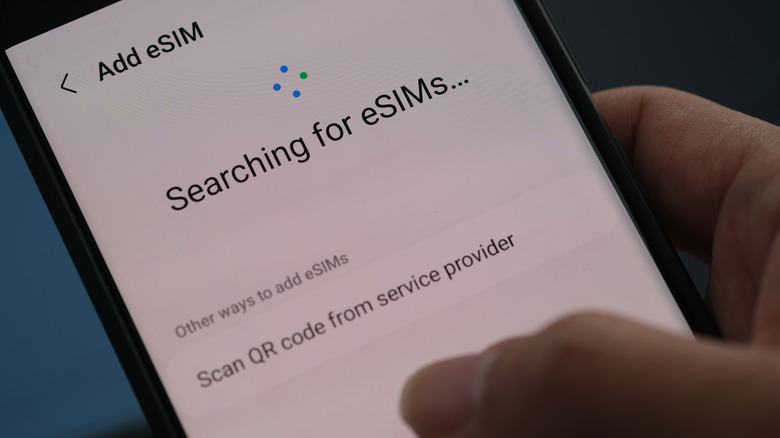
When traveling, there are a few best practices for using eSIM for international travel. First, always check if your phone is carrier-unlocked; an eSIM won't help if your device is still tied to a specific contract. Second, download your travel profile while you still have a stable Wi-Fi connection at home or in the airport. This ensures that you are connected the moment your plane touches the tarmac.
Android Fragmentation: Switching on Pixel vs. Samsung
One of the challenges of the Android ecosystem is that different manufacturers handle things differently. Knowing how to transfer eSIM on Android depends largely on whether you are using a Google Pixel, a Samsung Galaxy, or a device from another OEM.
If you are a Pixel user, the process is generally the most straightforward. Google has worked closely with carriers to ensure that Over-the-air (OTA) activation is seamless. When you set up a new Pixel, the system will often prompt you to transfer your SIM from your old device automatically. If you need to do it manually, you can find the option under Settings > Network & internet > SIMs. This is where you can see how to switch from physical SIM to eSIM on Google Pixel by following the Add SIM prompt and selecting the option to convert your existing card.
Samsung users have a slightly different path. The "SIM Card Manager" in the Connections menu is your hub for all things eSIM. Samsung has introduced a tool that allows for the transfer of eSIMs between Galaxy devices using your Samsung account, though carrier support for this feature can still be hit or miss depending on your region.
A word of caution for all Android users: an eSIM profile is often a one-time use token. If you delete a profile from your settings, you cannot simply "re-download" it like an app. You will often need a new QR code from your mobile network operator. Always choose to deactivate a profile rather than delete it unless you are certain you no longer need that specific service.
The 'Broken Phone' Problem: What You Lose with eSIM-Only
While I am a proponent of this technology, a balanced look at the pros and cons of moving to an eSIM-only Android device requires us to acknowledge the downsides. The most significant issue is what I call the "Broken Phone Problem."
With legacy SIM technology, if you drop your phone and the screen shatters or the motherboard dies, you can simply pull the SIM card out and put it into a backup phone. Within seconds, you have your phone number back and can receive essential SMS 2FA codes to log into your accounts. With an eSIM-only phone, if the hardware fails completely, your digital identity is trapped inside that broken device. You will have to contact your carrier, verify your identity, and wait for them to issue a new digital credential to a different device. This can be a major headache if you are in the middle of a trip or a busy workday.
Additionally, some smaller or regional carriers have been slow to adopt the infrastructure required for seamless eSIM management. While the major players are fully onboard, users who rely on budget MVNOs might find that their carrier doesn't support eSIM yet, or charges a fee for every "swap." This friction is a temporary hurdle as the industry matures, but it is a valid concern for buyers in 2026.
Despite these growing pains, the trajectory is clear. The physical SIM card is a relic of a more tactile, less secure era of mobile communication. As Android manufacturers refine the digital transfer experience and carriers move away from physical inventory, the tray-less future will become the standard.
FAQ
Is eSIM better than a physical SIM?
For most people, yes. It offers better security, more flexibility for travel, and allows for multiple profiles on one device. However, it can be more difficult to switch between phones if the device is physically broken.
What is the main difference between an eSIM and a physical SIM card?
The main difference is that a physical SIM is a removable card, while an eSIM is a permanent chip embedded in the phone's hardware. One requires manual handling, while the other is managed digitally through software.
Is an eSIM more secure than a physical SIM?
Yes, eSIMs are more secure because they cannot be physically removed if the phone is stolen. This prevents thieves from taking your SIM to use in another device for SIM swap fraud and keeps the stolen phone connected to the network for easier tracking.
How do I transfer an eSIM to a new phone?
On most Android devices, you can transfer an eSIM during the initial setup process using a QR code provided by your carrier or through a built-in transfer tool provided by manufacturers like Google or Samsung.
What are the disadvantages of using an eSIM?
The primary disadvantage is that you cannot quickly move your service to a backup phone if your current phone breaks. Additionally, not all carriers support eSIM, and some may charge fees or require customer service intervention to switch devices.