Quick Facts
- The Solution: Soundbar HDMI passthrough allows your audio equipment to serve as a hardware switcher for your home theater.
- Port Expansion: Most premium soundbars offer one or two extra soundbar HDMI inputs to supplement your television.
- Audio Fidelity: Direct connection to the soundbar ensures lossless Dolby Atmos and DTS:X by bypassing TV processing.
- Video Standards: High-end flagship models now support 4K/120Hz and Variable Refresh Rate (VRR) for modern gaming consoles.
- Cable Requirements: To utilize all features, you must use Ultra High Speed HDMI cables for the connection handshaking.
- Simplicity: CEC Control Sync allows you to manage the entire setup with a single remote despite the extra hardware.
Soundbar HDMI passthrough allows a soundbar to act as a hardware hub between a source device and a television. By connecting a streaming stick, gaming console, or Blu-ray player directly to the soundbar's HDMI input, the audio signal is processed locally while the video signal is passed through to the TV screen via the ARC or eARC connection. This setup is a highly effective solution for fixing tv hdmi port shortage with soundbar passthrough, especially for older or budget displays that lack sufficient inputs.
The Soundbar as an HDMI Hub: Expanding Your Connectivity
In my years reviewing audio gear, I have noticed a frustrating trend in the television market. While top-tier OLEDs might come with a full array of ports, modern smart TVs typically feature between three and four HDMI ports, and many entry-level models are limited to only one or two. Once you plug in a cable box, a PlayStation 5, and a Nintendo Switch, you are out of room. If you want to add a high-quality streaming device like an Apple TV or an Nvidia Shield, you are forced to play "musical chairs" with your cables.
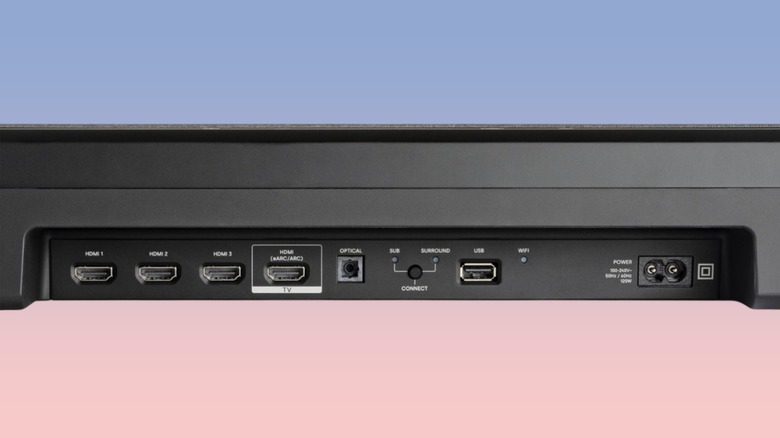
This is where your audio system can step in as a connectivity hub. By utilizing soundbar HDMI inputs, you effectively gain an extra port that functions exactly like the ones on the back of your TV. Instead of the TV being the center of your universe, the soundbar takes on the role of a hardware switcher. When you are using soundbar as hdmi hub for streaming devices, the soundbar "strips" the audio data immediately for its own speakers and sends the video data along its way to the display.
For those with extensive media libraries or multiple consoles, finding the best soundbars with multiple hdmi inputs for extra devices is a game-changer. It cleans up the cable clutter behind the TV and moves the connection point to a more accessible location. This home theater integration ensures that even if your TV was built with limited foresight regarding port count, your setup can grow as you add more source devices.
Lossless Audio: Why HDMI ARC vs eARC Matters
One of the most significant technical advantages of using Soundbar HDMI passthrough involves audio fidelity. Most users connect their devices to the TV and then rely on Audio Return Channel (ARC) to send the sound back down to the soundbar. However, older HDMI ARC standards have limited bandwidth, often forcing the TV to compress the audio or downmix it to a lower quality.
If you connect your 4K Blu-ray player directly to the TV, the television might not support DTS:X Surround Sound or lossless Dolby Atmos. By the time the signal reaches your soundbar via the return channel, it has been "squashed." By plugging the source directly into the soundbar, you ensure lossless audio processing happens before the TV ever touches the signal. This bypasses the need for the TV to understand the audio format entirely.
The industry is rapidly shifting toward the Enhanced Audio Return Channel (eARC). In fact, approximately 78% of soundbars priced above $400 were estimated to include eARC support by 2025. The difference in bitrate is massive:
| Feature | HDMI ARC | HDMI eARC |
|---|---|---|
| Max Bandwidth | ~1 Mbps | ~37 Mbps |
| Uncompressed 5.1 / 7.1 | No | Yes |
| Dolby Atmos (Lossless) | No (Only Compressed/DD+) | Yes (Dolby TrueHD) |
| DTS:X | No | Yes |
| Lip Sync Correction | Optional | Mandatory |
When analyzing soundbar hdmi passthrough vs tv arc connection differences, the direct path to the soundbar is almost always superior for audiophiles. It eliminates connection handshaking issues where the TV and soundbar fail to agree on which format to play, resulting in the dreaded "silence" or a fallback to basic stereo.
Video Quality and Gaming: HDMI 2.1 and 120Hz Passthrough
A common concern I hear from readers is whether passing video through a soundbar will degrade the image quality. Ten years ago, this was a valid fear. However, modern soundbars act as a transparent connectivity hub that preserves the original high bandwidth video signal.
For movie lovers, most mid-range soundbars easily handle 4K resolution with HDR10+ or Dolby Vision. The real challenge arises with gaming consoles like the PS5 and Xbox Series X. These devices require the HDMI 2.1 Standard to output 4K/120Hz video. If you use a soundbar with an older HDMI 2.0 port, your game will be capped at 60Hz, and you might lose out on Variable Refresh Rate (VRR) and Auto Low Latency Mode (ALLM).
The latest flagship audio units now feature soundbar 4k 120hz passthrough for ps5 and xbox series x. This allows gamers to enjoy the highest possible frame rates and lowest input latency without sacrificing audio quality. When shopping, always verify if the soundbar’s input is rated for 40Gbps or 48Gbps bandwidth. Without this, your high-end console will be throttled the moment it passes through the audio hardware.
Step-by-Step: How to Setup Your Passthrough Connection
Setting up a passthrough connection is straightforward, but you must pay attention to the labels on the back of your devices. Follow these steps to ensure a perfect sync:
- Identify the HDMI In port on your soundbar. Plug your most bandwidth-heavy device (like a 4K player or console) into this port.
- Locate the HDMI Out (ARC/eARC) port on the soundbar. This is the only port that should connect to your TV.
- Connect a high-speed HDMI cable from that soundbar output to the HDMI ARC or eARC port on your television.
- In your TV settings, navigate to the Audio menu and ensure "HDMI CEC" (often called Anynet+, Bravia Sync, or SimpLink) is enabled.
- Switch the TV input to the specific HDMI port the soundbar is plugged into. To see the video from your source device, switch the soundbar's input to HDMI In.
Using CEC Control Sync is vital here. It allows your TV remote to control the soundbar volume and tells the soundbar to switch inputs automatically when you power on your connected console. This "handshake" ensures the hardware switcher functionality feels invisible during daily use.

Recommended Hardware: Best Soundbars with Extra Ports
Choosing the right bar depends on your specific needs, whether you are a hardcore gamer or just someone looking to add an Apple TV to a port-starved kitchen television.
Samsung Q990F (Flagship Powerhouse)
The Q990F is the gold standard for home theater enthusiasts. It features two dedicated HDMI 2.1 inputs that support 4K/120Hz and VRR.
Who is this for: Gamers with multiple high-end consoles and those who want a true 11.1.4 channel Dolby Atmos experience without compromise.
Polk MagniFi Mini AX (Compact Efficiency)
If you have a smaller TV in a bedroom or office, this compact bar still offers one soundbar HDMI passthrough port. It supports Dolby Atmos and DTS:X in a tiny footprint.
Who is this for: Users with small TVs (which often only have 2 ports) who need to add a single streaming stick while upgrading their audio.
TCL S55H (Value Champion)
You don't need to spend a fortune to fix a port shortage. The S55H provides reliable 4K passthrough and eARC support at a fraction of the cost of flagship models.
Who is this for: Casual listeners who want to solve a port shortage on a budget-friendly TV while gaining much better sound than built-in speakers.
Samsung Terrace (Outdoor Integration)
For outdoor setups where TVs often have limited weather-sealed ports, the Terrace soundbar offers robust connectivity designed to withstand the elements.
Who is this for: Homeowners with outdoor entertainment areas where cable management and port availability are limited by weatherized enclosures.
FAQ
What is HDMI passthrough on a soundbar?
Soundbar HDMI passthrough is a hardware feature that allows the audio device to act as an intermediary. It receives a full HDMI signal from a source (like a cable box), extracts the audio for playback, and sends the original video signal to the TV.
Do I need HDMI passthrough if my TV has eARC?
Not strictly, but it is highly recommended if your TV has fewer than four ports or if the TV does not support certain audio formats like DTS:X. Passthrough ensures the soundbar gets the "raw" audio signal before the TV has a chance to alter it.
Does soundbar HDMI passthrough reduce video quality?
In most modern units, no. As long as the soundbar supports the resolution and HDR format of your source device, the video signal remains bit-perfect. However, using an older soundbar with a new 4K TV could limit you to 1080p if the hardware is outdated.
Can soundbar HDMI passthrough handle 4K resolution?
Yes, nearly all soundbars released in the last five years support 4K passthrough. Premium models also support advanced HDR formats like Dolby Vision and HDR10+ to ensure the picture quality matches the high-end audio.
Does HDMI passthrough introduce input lag?
For movies and TV shows, the soundbar automatically synchronizes audio and video. For gaming, a high-quality soundbar with HDMI 2.1 support introduces negligible lag (less than 1ms), though budget soundbars with poor processing may occasionally add slight delay if not properly configured.