Our Top Picks
The Samsung Galaxy S26 Ultra is a powerhouse of productivity, but its most impressive innovation isn't just speed—it is the discretion provided by the integrated privacy technology. For professionals who handle sensitive data or anyone tired of shoulder surfing on public transit, this device offers a seamless security layer that finally makes aftermarket films obsolete. While there is a slight trade-off in peak brightness, the benefit of hardware-level privacy far outweighs the cost for the security-conscious user.
The Samsung Galaxy S26 Ultra introduces a groundbreaking hardware-level privacy screen that makes side-viewing nearly impossible. The Galaxy S26 Ultra privacy screen uses hardware-level micro-optics technology to control light dispersion at the pixel level, suppressing lateral viewing angles to make the display invisible from the side while maintaining high color fidelity for the primary user.
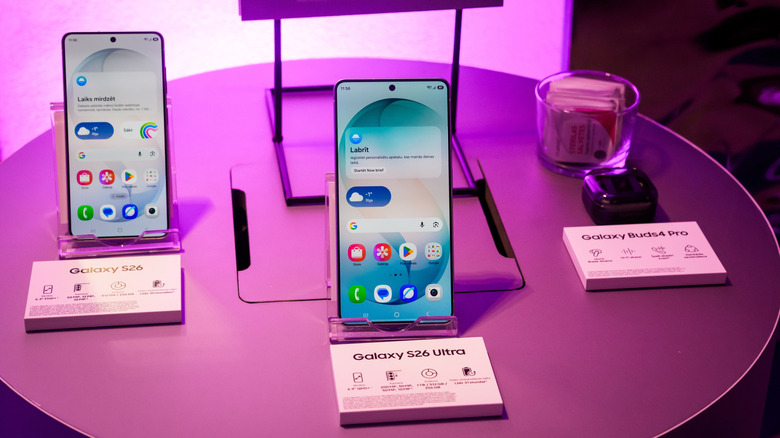
The Invisible Shield: How Pixel-Level Micro-Optics Work
We have all been there: sitting on a crowded train, trying to catch up on emails or check a bank balance, only to feel the eyes of the person next to us drifting toward our screen. It is a common problem in our increasingly mobile lives. In fact, a Samsung survey of 1,000 smartphone users in the UK found that 57% of respondents admitted to unintentionally looking at someone else's phone in public, while only 12% believed that public smartphone use is truly private. This lack of digital personal space is exactly what the Galaxy S26 Ultra aims to solve.
Unlike previous attempts at privacy that relied on software filters or darkening the UI, the Samsung Galaxy S26 Ultra features a hardware-level Privacy Display that utilizes specialized pixels to control light dispersion. This is not a simple filter; it is a technology that Samsung reports was in development for five years. At its core, the system utilizes a unique square subpixel layout. While standard OLEDs use a diamond or PenTile arrangement, this new panel utilizes a 2G, 1B, 1R configuration combined with microscopic optical louvers embedded directly into the display stack.
These micro-optics act like tiny, invisible blinds. When you look at the phone directly, the light passes through unimpeded, giving you the full 6.9-inch experience. However, as the viewing angle shifts past 30 degrees, the lateral viewing suppression kicks in. To a bystander, the screen appears as a flat, matte black surface, hiding your messages, spreadsheets, or banking details. This Galaxy S26 Ultra built-in privacy display technology represents a significant leap forward because it is baked into the hardware, meaning it does not rely on a permanent physical layer that you have to peel off if you want to show a photo to a friend.
The Trade-off: Brightness, Clarity, and 8-bit Panels
As an editor who looks at screens for a living, I have to be honest: no major hardware shift comes without a cost. When asking is the Galaxy S26 Ultra privacy display worth the upgrade from S25, you have to weigh the privacy against raw display performance. The Galaxy S26 Ultra privacy screen impact on display brightness and clarity is measurable. Because the micro-optics naturally block some light even at direct angles, there is a noticeable 300-nit drop in peak brightness compared to the S25 Ultra.
Furthermore, to accommodate the complex pixel-level light control, Samsung shifted from a 10-bit panel to an 8-bit panel. For the average user scrolling through Instagram, this is virtually imperceptible. However, if you are a professional colorist or a mobile photographer who demands perfect OLED color fidelity, you might notice slightly less nuance in HDR gradients. There is also the matter of the 480Hz PWM dimming, which remains excellent for reducing eye strain but must work harder to maintain consistency given the added optical layers.
To give you a better idea of how the hardware has shifted, here is a quick comparison of the display specifications:
| Feature | Galaxy S25 Ultra | Galaxy S26 Ultra |
|---|---|---|
| Peak Brightness | 2,600 nits | 2,300 nits |
| Pixel Layout | Diamond Subpixel | Square Subpixel with Micro-Optics |
| Color Depth | 10-bit | 8-bit |
| Privacy Tech | Software-based Blue Light Filter | Hardware-level Privacy Display |
| PWM Dimming | 480Hz | 480Hz (Optimized) |
While the brightness dip sounds significant on paper, in real-world usage scenarios like banking on a crowded train or working in a brightly lit coffee shop, the display remains perfectly legible. The anti-reflective coating on the S26 Ultra is actually more effective than its predecessor, helping to offset the lower peak nit count by reducing glare. Additionally, the Samsung Galaxy S26 Ultra privacy screen battery life impact is negligible because the privacy is managed via physical light direction rather than power-hungry software processing.
Built-in vs. Physical Protectors: Do You Still Need Tempered Glass?
One of the most frequent questions I get is about the Galaxy S26 Ultra built-in privacy vs screen protectors. In the past, if you wanted privacy, you had to buy a thick, matte, plastic film that made your $1,300 phone feel like a toy. Those physical protectors often suffered from a "screen door" effect, where you could see the physical lines of the privacy filter, and they almost always ruined the clarity of the beautiful Samsung display.
The Galaxy S26 Ultra invisible privacy screen benefits are clear here: you maintain the premium glass feel and the high-resolution crispness of the screen. Because the privacy tech is inside the display, it does not interfere with biometric authentication. Traditional privacy protectors often struggle with the ultrasonic fingerprint sensor, requiring users to press harder or deal with frequent failed scans. The integrated solution on the S26 Ultra works perfectly with the Gen-4 Ultrasonic sensors, ensuring your device stays secure without becoming a hassle to unlock.
However, does the Galaxy S26 Ultra built-in privacy display vs physical screen protectors debate mean you should go "naked"? Not necessarily. While the built-in tech handles the privacy, it does not protect against drops. I still recommend a high-quality clear glass protector to act as a sacrificial layer against cracks. Just ensure you are not buying a Galaxy S26 Ultra privacy screen compatibility with glass screen protectors that also includes a privacy tint, or you will end up with a screen that is far too dim to use.
Setup Guide: Optimizing Privacy for Specific Apps
What makes this phone truly "Ultra" is the contextual AI awareness. You don't always need the privacy screen active. If you are at home watching a movie, you want the widest viewing angles possible. Samsung has cleverly integrated the privacy toggle into One UI.
Knowing how to enable Galaxy S26 Ultra privacy screen for specific apps is the key to mastering this device. You can set the phone to automatically activate the privacy mode when you open sensitive applications.
- Financial Apps: Set your mobile banking and crypto wallet apps to trigger the privacy mode instantly upon launch.
- Messaging: Enable the feature for WhatsApp or Slack so your private conversations stay private, even if someone is standing directly over your shoulder.
- The Lock Screen: You can set the privacy filter to be active by default on the lock screen, preventing people from reading your notifications before you even unlock the device.
- Orientation Control: Note the Galaxy S26 Ultra invisible privacy screen horizontal vs vertical mode efficacy. The micro-optics are optimized for portrait mode (vertical), which is how most people use their phones in transit. In horizontal mode, the viewing angle suppression is less aggressive to allow for shared media viewing.
To set this up, navigate to Settings > Display > Privacy Display. From there, you can choose "Always On," "Manual Toggle" (accessible from the Quick Settings panel), or "App-Specific." This provides a flexible security experience that adapts to your environment, a luxury that permanent physical accessories simply cannot offer.
Conclusion: The Future of Mobile Security
The Galaxy S26 Ultra is a bold step toward a future where our devices are smart enough to protect our personal space. By moving privacy from a sticky plastic afterthought to a core hardware feature, Samsung has solved one of the most persistent annoyances of public smartphone use. While the shift to an 8-bit panel and the slight reduction in peak nits might give some spec-heads pause, the real-world utility of the Galaxy S26 Ultra privacy screen is undeniable. It is a sophisticated, invisible shield that ensures your private life stays exactly that—private.
FAQ
What is the best privacy screen protector for the Galaxy S26 Ultra?
The best privacy screen for the S26 Ultra is actually the one already built into the hardware. Because the device features an integrated hardware-level Privacy Display, you do not need to buy a third-party privacy protector. In fact, adding a physical privacy film on top of the built-in technology will likely make the screen too dark and significantly degrade image quality. If you want protection, stick to a high-quality, clear tempered glass protector that does not have built-in tinting.
Do privacy screen protectors work with the ultrasonic fingerprint sensor on the S26 Ultra?
While traditional aftermarket privacy protectors often interfere with the ultrasonic fingerprint sensor due to their thickness and material density, the S26 Ultra's built-in privacy technology has no impact on biometrics. Because the light-control micro-optics are part of the internal display stack, the ultrasonic waves can pass through the top glass and reach the sensor without obstruction, maintaining the fast and accurate unlocking experience Samsung is known for.
Will a privacy screen affect S Pen functionality or sensitivity?
The built-in privacy display on the S26 Ultra does not affect S Pen functionality. Since the privacy layers are embedded beneath the digitizer and the Gorilla Glass Armor, the S Pen's pressure sensitivity and latency remain identical to previous generations. Users will still experience the smooth, paper-like writing feel without any interference from the privacy-regulating micro-optics.
Does a privacy screen reduce the display brightness and clarity of the S26 Ultra?
Yes, there is a minor impact. The Galaxy S26 Ultra sees a reduction of about 300 nits in peak brightness compared to the S25 Ultra because the micro-optic louvers naturally block a small portion of light. Additionally, the shift to an 8-bit panel means color gradients may not be quite as smooth as a 10-bit panel. However, for most real-world usage, the screen remains incredibly sharp and sufficiently bright for outdoor use, especially given the improved anti-reflective coating.
Are tempered glass privacy screens better than film protectors for the S26 Ultra?
For most phones, tempered glass is preferred for its feel and protection, but for the S26 Ultra, neither is recommended for privacy purposes. Since the phone already has hardware-level privacy, adding a tempered glass privacy protector would be redundant and detrimental to the viewing experience. If you are looking for impact protection, a standard, non-privacy tempered glass protector is the best choice, as it provides the best tactile feel and clarity while allowing the built-in privacy tech to do its job.