Quick Facts
- Release Date: Officially launched on March 11, 2026, as the debut platform for the new software.
- Operating System: Built on the Android 16 framework, offering deep system-level optimizations.
- Customization: Features a fully modular Quick Settings panel and AI-driven Aesthetic Intelligence for lock screens.
- Security: Debuts the Failed Authentication Lock and an expanded Identity Check protocol for high-risk settings.
- Ecosystem: Includes Bluetooth Auracast for multi-device audio and Storage Share for remote file access across the Galaxy suite.
- AI Integration: Introduces Agentic AI and the Now Brief daily insight tool.
- Compatibility: Available for the Galaxy S26 series out of the box, with rollouts for S25, S24, and recent Z series foldables.
One UI 8.5 features represent a significant leap in mobile software, introducing a fully customizable Quick Settings panel and an adaptive lock screen clock that uses Aesthetic Intelligence to maintain visual harmony. By combining advanced security protocols like the Failed Authentication Lock with ecosystem-first tools like Auracast and Storage Share, Samsung S26 software upgrades prioritize both user agency and seamless device interoperability.
Aesthetic Intelligence: One UI 8.5 Customization Guide
When you first pick up the Galaxy S26, the visual shift is immediate. Samsung has moved away from the rigid grids of the past, embracing a design philosophy they call Aesthetic Intelligence. The standout feature here is the redesigned Quick Settings panel. Unlike previous iterations where you were stuck with fixed icon sizes, One UI 8.5 allows you to resize and rearrange individual toggles. If you use Wi-Fi and Bluetooth constantly but rarely touch Airplane Mode, you can expand the primary connectivity toggles into larger, more accessible tiles while shrinking others into a compact view.
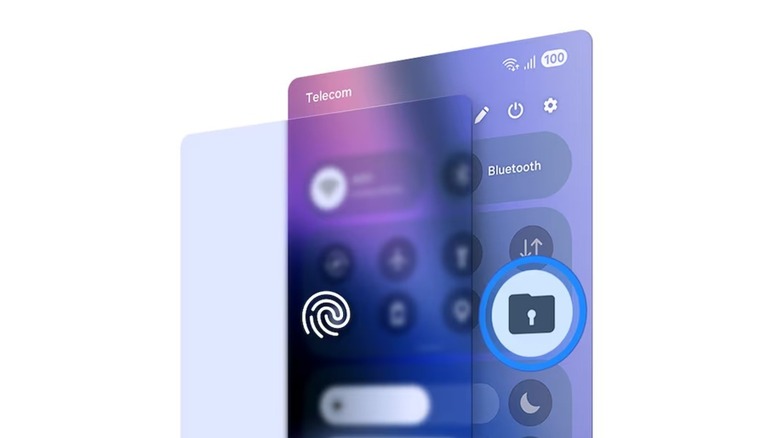
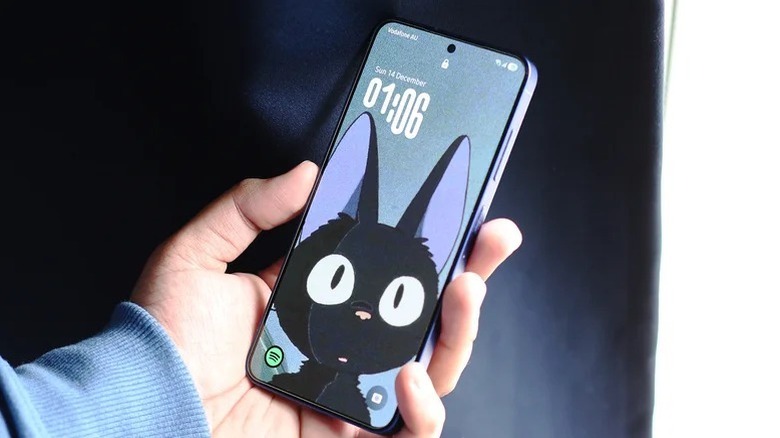
The personalization continues on the lock screen. Many users have struggled with beautiful wallpapers being obscured by the clock. One UI 8.5 solves this with an adaptive lock screen clock. This feature uses on-device AI to analyze your wallpaper's composition. If you have a portrait of a person or a specific architectural element, the clock automatically scales and repositions itself to avoid covering the subject. It is a subtle change that makes the device feel significantly more premium and tailored to your personal taste.
Setting up Samsung S26 adaptive lock screen clock is straightforward. You simply long-press the lock screen, enter the edit mode, and select the Adaptive option under the clock settings. The system then offers several layout suggestions based on the depth and color palette of your chosen image. This level of visual interface refinement is a core part of how the One UI 8.5 customization guide helps users make their device truly theirs.
Fortifying Your Galaxy: Samsung Anti-Theft Features 2026
Mobile security has evolved from simple passwords to complex behavioral analysis. With the release of the Galaxy S26, Samsung has introduced a robust suite of Samsung Galaxy anti-theft features 2026 to combat increasingly sophisticated theft methods. The most notable addition is the Failed Authentication Lock. This feature is designed for scenarios where a device might be snatched while unlocked or where a thief attempts to guess a PIN to access sensitive financial apps.
If the system detects multiple unsuccessful attempts to access protected applications—such as your banking app or Samsung Pay—the Failed Authentication Lock triggers a total device lockdown. Unlike a standard screen lock, this mode requires a secondary form of biometric authentication or your Samsung Account password to restore access, effectively bricking the data for an unauthorized user.
Furthermore, the expanded Identity Check protocol now blankets a wider range of critical system settings. In previous versions, you might only need a PIN to change network settings or factory reset. Now, One UI 8.5 requires a biometric check for any change to the Find My Mobile settings, eSIM management, or the new Storage Share permissions. This ensures that even if someone manages to bypass your initial lock screen, they cannot easily disable the tracking or remote wipe capabilities of the device.
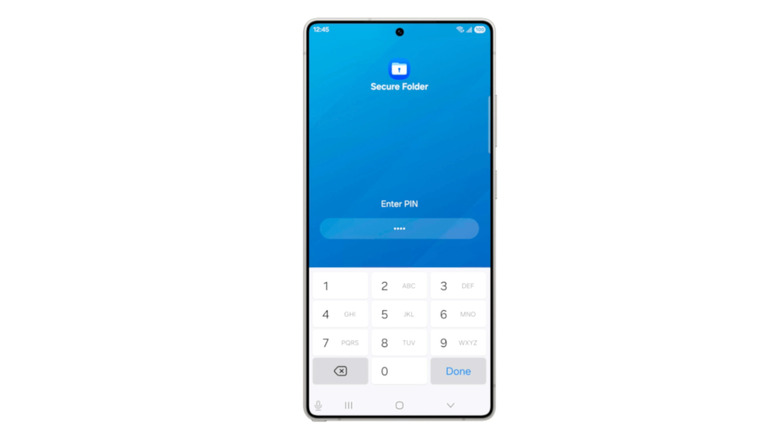
For those in high-risk environments, the One UI 8.5 failed authentication lock setup guide suggests enabling Lockdown Mode via the power menu. This temporarily disables all biometric authentication, forcing a password entry for the next unlock—a vital tool if you are concerned about being forced to unlock your phone with your fingerprint. These data protection measures ensure the S26 remains a leader in mobile security protocols.
Seamless Connectivity: Auracast and Storage Share
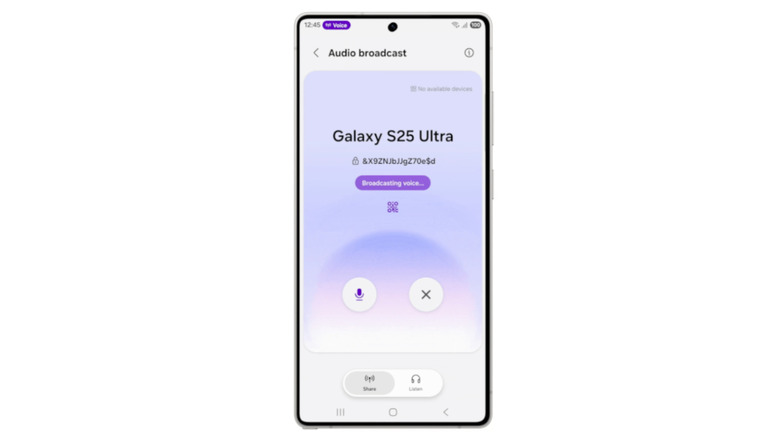
Samsung has always excelled at creating a walled garden that feels more like an open park, and One UI 8.5 doubles down on this. The introduction of Bluetooth Auracast broadcasting is a game-changer for social audio. Traditionally, sharing audio meant using a physical splitter or a specific "Dual Audio" feature limited to two devices. Using Samsung Auracast to share audio on Galaxy S26, you can now broadcast your podcast, music, or movie audio to an unlimited number of compatible headphones or speakers simultaneously.
This is particularly useful for travelers or fitness enthusiasts. Imagine a group of friends waiting at an airport, all listening to the same movie from one S26, each using their own Galaxy Buds. Setting up the Samsung S26 Auracast setup for home audio systems is equally simple, allowing your phone to act as a central hub that syncs multiple speakers across different rooms without the latency issues typically associated with standard Bluetooth.
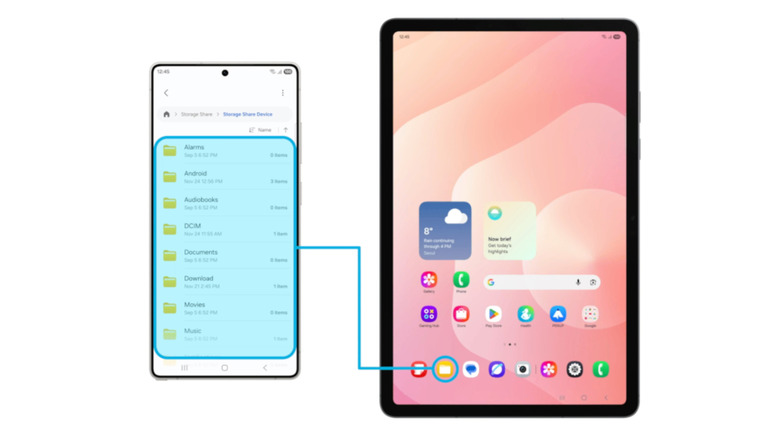
Beyond audio, the new Storage Share feature streamlines how we manage our digital lives. Within the Galaxy ecosystem, Storage Share allows you to remotely browse and move files between your S26, a Galaxy Tab, and a Galaxy Book. It effectively creates a private cloud that doesn't rely on third-party servers.
To use this, you simply enable the feature in the My Files app. Once active, you can access your phone’s entire folder structure from your tablet as if it were a local drive. This is the epitome of ecosystem integration, making remote file management intuitive rather than a chore. Whether you are transferring 8K video footage for editing or simply grabbing a PDF from your laptop while on the go, the software handles the heavy lifting in the background.
Performance and AI: Now Brief and Pro Camera Tools
The Samsung Galaxy S26 series was officially released on March 11, 2026, and it brings the most advanced version of Galaxy AI we have seen to date. Samsung reported that by late 2025, 70% of Galaxy S25 series users were actively utilizing Galaxy AI tools, and One UI 8.5 aims to push that number even higher by making AI more proactive.
Central to this is 'Agentic AI.' Unlike previous AI tools that waited for a prompt, Agentic AI anticipates your needs. For instance, the Now Brief feature provides a personalized morning report by integrating your health data, calendar, and even recent sleep patterns to suggest how you should tackle your day. If your sleep was poor, Now Brief might suggest a lighter workout or remind you to take frequent breaks.
Optimizing Galaxy S26 performance with One UI 8.5 features also involves the camera stack. For the Ultra models, there is a new high-resolution 24MP toggle. This bridges the gap between the storage-heavy 200MP shots and the standard 12MP binned images, offering the perfect balance of detail and file size. Social media creators will also appreciate the Real-time Audio Eraser. While recording video, the AI can actively identify and suppress background noise like wind or traffic, focusing purely on your voice without the need for post-production editing.
The Samsung One UI 8.5 update is more than just a skin; it is a fundamental rethink of how a smartphone should interact with its user. It bridges the gap between hardware power and daily utility, ensuring the S26 isn't just a spec monster, but a genuinely helpful companion.
FAQ
What are the top new features in One UI 8.5?
The standout features include the fully customizable Quick Settings panel where users can resize tiles, the adaptive lock screen clock driven by Aesthetic Intelligence, and the introduction of Bluetooth Auracast for unlimited audio sharing. Additionally, the software introduces significant security upgrades like the Failed Authentication Lock and the AI-driven Now Brief for personalized daily insights.
When will One UI 8.5 be released?
One UI 8.5 made its debut alongside the launch of the Samsung Galaxy S26 series on March 11, 2026. While it is available immediately on those flagship devices, it is expected to roll out to older compatible devices, such as the S25 and S24 series, in the subsequent months following the initial release.
What is the difference between One UI 8.0 and One UI 8.5?
One UI 8.5 vs One UI 8 software differences for S26 are primarily found in the refinement of the AI and customization options. While One UI 8.0 introduced the base Android 16 features, 8.5 adds the Agentic AI layer, the modular Quick Settings redesign, and the enhanced Identity Check protocols that were not present in the earlier version.
Will One UI 8.5 include new AI tools?
Yes, One UI 8.5 introduces several new AI-driven tools, most notably Agentic AI, which acts as a proactive assistant. Another major addition is Now Brief, which synthesizes health, activity, and calendar data into a daily overview. The camera also benefits from new AI tools like the Real-time Audio Eraser for video recording and enhanced image processing for the 24MP mode.
Which devices are compatible with One UI 8.5?
One UI 8.5 is compatible with the entire Galaxy S26 series (Base, Plus, and Ultra). Samsung has also confirmed that the software will be available for the Galaxy S25 and S24 series, as well as the Galaxy Z Fold 7 and Z Flip 7. Some older flagship tablets in the Galaxy Tab S series are also expected to receive the update.