Quick Facts
- Average Lifespan: 4-5 years for budget sticks, 10+ years for premium Ultra models.
- Software Window: Roku typically provides 8-9 years of OS update support.
- 2026 Standards: Look for Wi-Fi 6E connectivity and HDMI 2.1 for the best longevity.
- Performance Sign: User interface lag is the primary indicator that your processor performance is struggling.
- New Hardware: Roku 2025 updates introduced sticks that are 35% smaller and start at $29.99.
- Upgrade Trigger: Move to a 2026 model if you encounter frequent overheating or lack of 8K resolution support.
On average, a Roku device lifespan ranges from four to five years, though high-end hardware like the Roku Ultra can often function for a decade or more. While the physical components are generally durable, the device may feel slower over time as new software updates and streaming apps demand more processing power than older legacy hardware can provide.
The Reality of Roku Hardware Durability in 2026
When we talk about Roku hardware durability, we have to distinguish between the device physically breaking and the hardware simply becoming obsolete. In my experience testing smart home gear, Roku players are remarkably sturdy. They don’t have moving parts, and unless they suffer a power surge or physical damage, the internal circuits can technically last for many years. However, the ownership experience varies wildly depending on which model you choose.
Budget-friendly devices like the Roku Express and the basic Streaming Stick are designed for value, but they often face heat-related challenges. Because these small sticks sit directly behind a hot TV panel, they are prone to overheating issues. If you have been using a budget stick for a while, you might notice signs your Roku hardware is failing after two years, such as random reboots or a remote that constantly disconnects.
In contrast, the premium Roku Ultra is built like a tank. It has better heat dissipation and more robust components. This creates a significant gap in the expected lifespan of Roku TVs vs streaming players. While a Roku TV has a large screen that might last 7 to 10 years, the built-in processor often starts to feel sluggish after just three or four years. This is why I often recommend the "stick-over-TV" strategy: when your smart TV starts to lag, don't buy a new TV—just plug in a $30 streaming player to handle the processing.
It is also worth noting that Roku reported an 80.4M hardware loss in recent years, which has pushed the company to focus more on its ad-supported operating system. This means your hardware is increasingly a gateway to their software services, and the physical durability is high because they want you to stay in their ecosystem as long as possible.
| Model Category | Physical Durability | Optimal Performance Life | Key 2026 Consideration |
|---|---|---|---|
| Streaming Stick / Express | 4 - 6 Years | 2 - 3 Years | Prone to overheating |
| Roku Ultra / Ethernet Models | 10+ Years | 5 - 7 Years | Best for 8K resolution support |
| Integrated Roku TVs | 7 - 10 Years | 3 - 4 Years | Often requires external stick later |
Decoding the Roku Software Support Lifecycle
The real "death" of a streaming device usually comes from the software, not the hardware. The Roku software support lifecycle is actually quite impressive compared to other IoT devices. Roku typically provides firmware updates for legacy models for approximately eight to nine years. For example, in 2026, many devices released in 2017 are still receiving basic security patches and OS 14.5 updates.
However, just because you have the latest software doesn't mean your device will run it well. As apps like Netflix, Disney+, and YouTube evolve, they require more system memory and better processor performance. This is where user interface lag comes in. If your Roku takes five seconds to respond to a remote click, the hardware isn't "broken," but its system memory can no longer handle the modern app demands.
Roku manages this by phasing out support only when the hardware can no longer reliably run the Roku OS. If you are a power user who wants a snappy experience, the Roku software update support lifecycle for legacy models might feel shorter than it actually is. By year five, most users will notice that app loading times have doubled compared to a new 2026 model.
2026 Buying Guide: Future-Proof Roku Models
If you are shopping for a new device this year, the goal is to find future-proof Roku models 2026 that will last until the end of the decade. The landscape of home entertainment has shifted, and your hardware needs to keep up.
The most significant change in 2026 is the mainstream adoption of higher connectivity standards. When looking for the best future proof Roku streaming stick to buy in 2026, you should prioritize Wi-Fi 6E connectivity. This standard uses the 6GHz band, which is less crowded and provides the stable bandwidth needed for 4K and 8K streaming without buffering.
Roku's 2025 hardware updates set the stage for this, introducing a new Streaming Stick and Streaming Stick Plus that are 35% smaller than previous models and priced at approximately $29.99 and $39.99, respectively. These models are excellent for standard 4K setups, but if you have a high-end home theater, you should ask: is it worth upgrading to a 2026 Roku for 8K support? If you own an 8K display, the answer is yes, specifically to get the HDMI 2.1 standard which supports higher frame rates and Quick Media Switching (QMS).
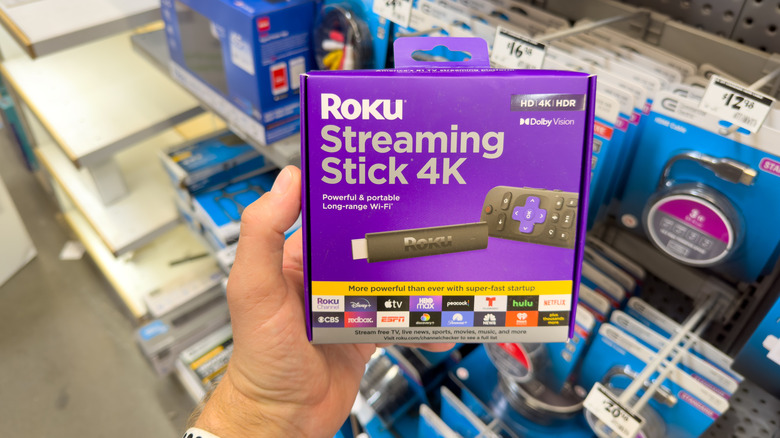
For those looking for the ultimate longevity, the Roku Ultra remains the king. It often includes the Voice Remote Pro, which features a lost-remote finder and a rechargeable battery—addressing two common hardware "failures" (lost remotes and battery corrosion) that usually plague cheaper models.
How to Extend the Lifespan of Your Roku
You don't always need to buy new hardware to fix a slow experience. If you aren't ready to upgrade, there are several ways to how to speed up a slow Roku streaming device and keep it running for another year or two.
First, address the overheating issues. If you use a streaming stick, use the free HDMI extender cable provided by Roku. This moves the stick away from the back of the TV, allowing for better airflow. Heat is the number one killer of small electronics, and keeping your Roku cool can significantly extend its physical Roku device lifespan.
Second, manage your software health. Performing a factory reset every two years can clear out system glitches that accumulate over time. You should also practice regular cache management by removing apps you no longer use. Every app installed takes up a small amount of system memory, and on older hardware, every megabyte counts toward maintaining app compatibility and speed.
Finally, stay aware of the evolving privacy landscape. Recent legal discussions, such as the 2025 Florida privacy lawsuit regarding data tracking, have led to more robust privacy controls in the Roku OS. Reviewing your ad-tracking settings and managing your subscriptions (including newer ad-free tiers like the Howdy subscription) can sometimes reduce the background processing load on your device, making the UI feel a bit more responsive.
FAQ
How many years does a Roku device typically last?
A Roku device typically lasts between four and five years for the average user. While the physical hardware is often durable enough to last ten years, the internal processor usually becomes too slow to run modern apps effectively after about half a decade.
When should I consider replacing my Roku?
You should consider replacing your Roku when you notice significant user interface lag, apps frequently crashing, or when the device no longer supports the latest wireless standards like Wi-Fi 6E. If your device is more than five years old and feels sluggish even after a factory reset, it is likely time for an upgrade.
What are the signs that a Roku is failing?
The most common signs of failure include frequent overheating issues, constant remote-syncing problems, and the device randomly restarting during playback. If you see an on-screen warning about heat or if the UI response time is delayed by several seconds, the hardware or the system memory is likely struggling.
Do older Roku models still get updates?
Yes, older Roku models typically receive software updates for eight to nine years after their release. Roku is known for a long Roku software support lifecycle, though older hardware may not support specific new features like 8K resolution support or advanced gaming modes due to physical hardware limitations.
How long does a Roku Streaming Stick last?
A Roku Streaming Stick generally has a shorter optimal lifespan of about three to four years. Because of its compact size, it is more susceptible to heat from the TV, which can lead to faster component degradation compared to larger, standalone players like the Roku Ultra.
How do I extend the lifespan of my Roku player?
To extend your Roku device lifespan, ensure it has plenty of ventilation to prevent overheating issues. Use an HDMI extender for sticks, perform a periodic factory reset to clear the system cache, and remove unused apps to free up system memory and improve overall processor performance.