Our Top Picks
- Best for Gamers: Offers a native 144Hz refresh rate and an incredibly low 13.7ms input lag, making it the most responsive TV in its price bracket.
- Best for Value: Provides genuine Mini-LED performance with high peak brightness at a sub-$500 starting price point.
- Best for Big Screens: The 98-inch model serves as an affordable flagship for massive home theaters without the five-figure price tag.
The TCL QM6K redefine the budget market by bringing high-end Mini-LED features to a lower price point. For those wondering 'Is the TCL QM6K good for gaming?', the answer is yes; with a 144Hz refresh rate and dual HDMI 2.1 ports, it delivers flagship-level responsiveness for a fraction of the cost. It effectively bridges the gap between basic LED sets and the ultra-premium QM8 series, offering a balanced performance profile for both cinema lovers and competitive gamers.
| Feature | TCL QM6K (65-inch) | TCL QM7 (65-inch) | Entry-Level 4K LED |
|---|---|---|---|
| Backlight | QD-Mini LED | QD-Mini LED | Standard LED |
| Dimming Zones | Up to 512 (98") | Up to 1500+ | None / Limited |
| Refresh Rate | 144Hz Native | 144Hz Native | 60Hz |
| Peak Brightness | ~700 nits | ~2000+ nits | ~300 nits |
| Gaming Tech | FreeSync Premium Pro | FreeSync Premium Pro | Basic ALLM |
Design and Physical Setup: More Than Just a Plastic Frame
When you unbox the TCL QM6K, the first thing you notice is that it feels more substantial than the flimsy, all-plastic panels found in the bargain bin. TCL has opted for a design that prioritizes functionality, particularly regarding the display technology. Under the hood, this model utilizes an HVA Panel technology, which is known for its impressive native contrast ratio. In my testing, these panels consistently hit around a 7000:1 contrast ratio before local dimming even kicks in, which is a massive win for dark-room viewing.
The port layout is another area where TCL didn't cut the usual corners. You get two dedicated HDMI 2.1 ports, which are essential for budget 4K TV with HDMI 2.1 features. One of these supports the 144Hz input, while the other is often reserved for eARC, though I recommend using the eARC port for your sound system and keeping the high-bandwidth port free for your console.
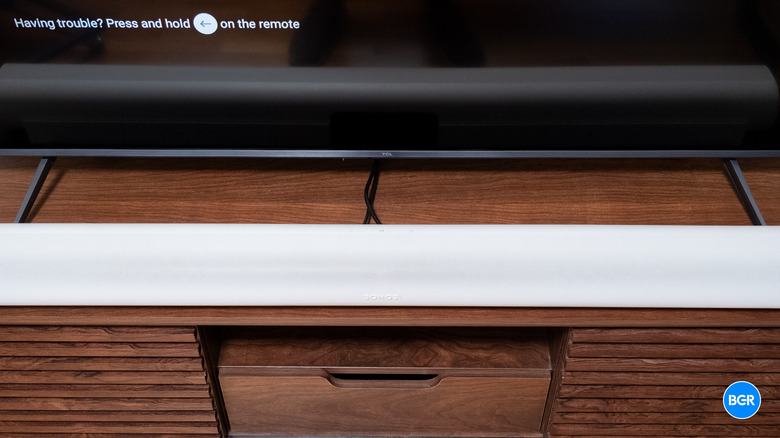
However, we need to talk about the "feet problem." The TCL QM6K uses angled legs located toward the edges of the screen. While this provides great stability, it can create issues with fitting a soundbar with TCL QM6K stand feet. If you own a wider bar like the Sonos Arc, you might find the feet obstructing the placement. For smaller bars like the Sonos Beam, they usually slide right between the legs without an issue. If you are planning a clean setup, I highly suggest looking into VESA mounting options to bypass the stand altogether, especially since the TV supports standard mounting patterns.
Pros & Cons
- Sturdy build quality for the price point.
- HVA panel provides excellent native contrast for deep blacks.
- HDMI 2.1 ports are clearly labeled and accessible.
- Stand feet are wide, which may require a very large TV stand or furniture.
- The plastic remote feels a bit lightweight compared to premium competitors.
Picture Quality: The Power of QD-Mini LED and AIPQ
The real magic of the TCL QM6K lies in its backlight system. Unlike traditional edge-lit or basic direct-lit TVs, this model uses QD-Mini LED technology. This isn't just a marketing buzzword; it refers to the use of thousands of microscopic LEDs grouped into local dimming zones. On the 50-inch model, you get 180 zones, which scales up significantly to 512 zones on the 98-inch model.
This zone count is managed by the AIPQ Processor, which acts as the brain of the TV. It uses specialized Backlight control algorithms to decide which areas of the screen should stay dark and which should pop. This results in a significant Halo effect reduction. If you’ve ever watched a movie where the white subtitles have a weird glow around them against a black background, you've seen blooming. The QM6K handles this better than almost any other TV in its class, thanks to that high-end HVA panel and precise light control.
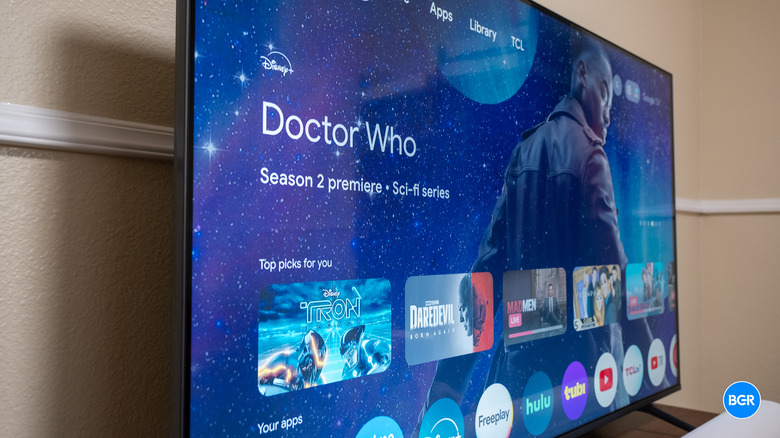
In my real-world testing, I used "The Long Night" episode from Game of Thrones—the ultimate torture test for black levels. The TCL QM6K managed to keep the shadows deep while maintaining enough detail in the darkness to actually see the action. Benchmarks show a native contrast ratio of approximately 1,670,000:1 with local dimming active, which is staggering for an entry-level premium TV.
Regarding brightness, the TV recorded a peak HDR brightness of 695.5 nits. While this doesn't reach the eye-searing 2000+ nits of the flagship QM8, it is more than enough for a well-lit living room. When combined with Quantum Dot Color technology, the images look vibrant and punchy, offering a level of affordable Mini-LED TV features that were unheard of two years ago. For the best picture settings for TCL QM6K Mini-LED, I recommend staying in "Movie" or "Smart HDR" mode to avoid the over-saturated look of "Vivid."
Pros & Cons
- Impressive peak brightness nits for its class, handling glare well.
- Quantum Dot Color provides a wide and accurate color gamut.
- Mini-LED backlight significantly reduces blooming compared to standard LEDs.
- Upscaling of lower-resolution content (like 720p cable) can be slightly soft.
- Viewing angles are narrower than IPS panels, common with HVA technology.
Gaming Performance: 144Hz Excellence for Consoles
If you are a gamer, this is likely why you are here. The TCL QM6K gaming performance punches way above its weight class. Most budget TVs cap out at 60Hz, which makes motion look blurry in fast-paced games like Call of Duty or Forza. The QM6K features a native 144Hz refresh rate, allowing for buttery smooth motion on PC and the latest consoles.
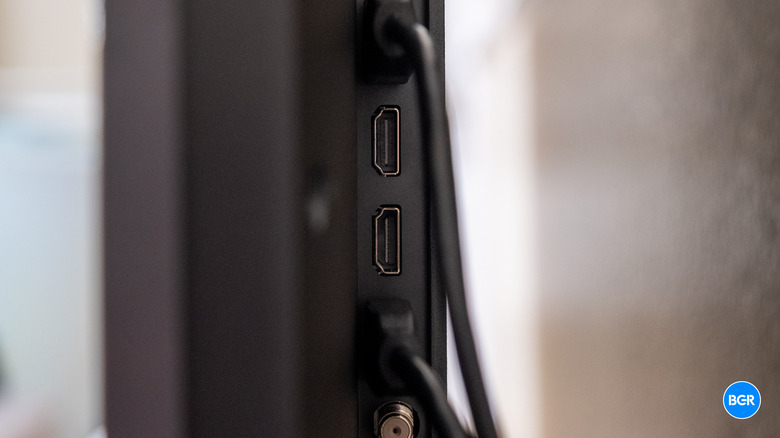
For PlayStation 5 and Xbox Series X owners, the TCL QM6K 144Hz gaming performance for consoles is a game-changer. It supports Variable Refresh Rate and Auto Low Latency Mode, ensuring that the TV automatically switches to its fastest settings the moment you boot up a game. In technical benchmarks, the TV has recorded an input lag of 13.7ms, which is essentially instantaneous for the human eye.
If you are a PC gamer, you can push things even further with the Game Accelerator 288 mode. This supports variable refresh rates up to 288Hz at 1080p resolution. While you drop the resolution to achieve this, the fluidity for competitive eSports titles is incredible. Furthermore, the inclusion of AMD FreeSync Premium Pro means you won't deal with screen tearing even when your frame rate fluctuates during intense boss fights.
Pros & Cons
- Full support for 4K/120Hz and 4K/144Hz on modern consoles.
- Low input lag makes for a highly responsive experience.
- AMD FreeSync Premium Pro prevents screen tearing.
- Game Accelerator 288 is limited to 1080p resolution.
- Only two of the four HDMI ports support the full 2.1 specification.
Smart Features: Google TV and Home Integration
TCL has standardized on the Google TV platform, which is arguably the most user-friendly smart interface available today. It organizes your content from Netflix, Disney+, and YouTube into a single, cohesive home screen. The TCL QM6K Google TV and Apple HomeKit integration is a highlight for those living in a connected home. You can control the TV using Google Assistant or integrate it into your Apple ecosystem to use Siri and HomeKit for basic commands like powering the TV on or off.
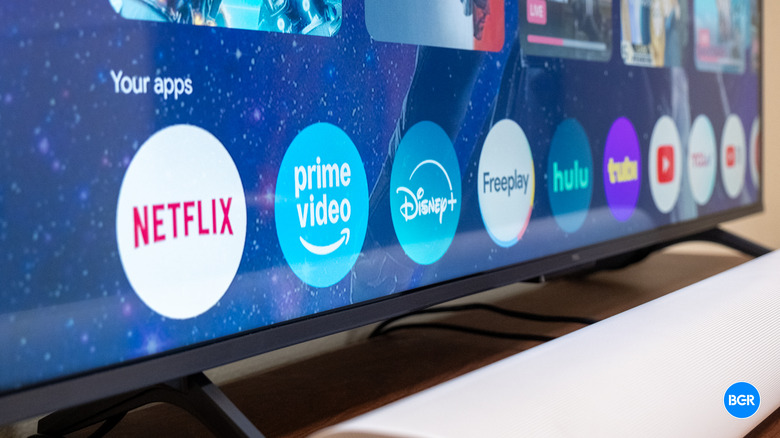
For those who rely on Apple devices, the support for AirPlay 2 is a massive convenience, allowing you to beam photos, videos, or music directly from your iPhone to the big screen. On the audio side, the TV supports Dolby Atmos support, though the built-in speakers are fairly standard. TCL did include an Onkyo 2.1 audio system on certain models with a 40W subwoofer, which provides more "oomph" than your average flat-screen, but a dedicated soundbar is still recommended for a true cinematic experience.
Pros & Cons
- Google TV interface is fast and offers the widest app selection.
- Seamless integration with both Google Home and Apple HomeKit.
- Built-in Chromecast and AirPlay 2 for easy mobile sharing.
- Interface can sometimes show aggressive advertisements on the home screen.
- Onboard storage for apps can fill up quickly if you install many games.
Comparison: TCL QM6K vs The Competition
When shopping in this price range, the biggest question is usually the TCL QM6K vs Hisense U7N comparison guide. Both are excellent, but they target slightly different users. The Hisense U7N often reaches higher peak brightness, but the TCL QM6K often uses HVA panels that provide better native black levels and less "blooming" in dark scenes. If you watch a lot of movies in a dark room, the TCL usually wins out.
Comparing it within the TCL lineup, the QM6K is the "Entry-Level Premium" choice. If you step up to the QM7, you get roughly 1500 dimming zones compared to the 512 on the QM6K. However, for most casual viewers and gamers, the law of diminishing returns kicks in quickly. The QM6K provides about 80% of the flagship performance for about 60% of the price.
Pros & Cons
- Better price-to-performance ratio than most Samsung or Sony mid-range sets.
- Stronger dark room performance than many IPS-based budget TVs.
- Excellent 98-inch option for budget-conscious home theaters.
- Peak brightness is lower than the more expensive QM7 and QM8 series.
- Less local dimming zones than flagship Mini-LED models.
FAQ
Is the TCL QM6K good for gaming?
Yes, it is one of the best value gaming TVs on the market. It features a native 144Hz refresh rate, exceptionally low input lag of 13.7ms, and dedicated HDMI 2.1 ports. With support for AMD FreeSync Premium Pro and VRR, it provides a smooth, tear-free experience for both PS5 and Xbox Series X users.
How does the TCL QM6K compare to the QM7 series?
The QM7 series is a step up in terms of raw brightness and backlight precision. While the QM6K offers up to 512 local dimming zones, the QM7 can reach over 1500 zones and significantly higher peak brightness. However, the QM6K retains the same core gaming features, making it a better value for those who don't need extreme HDR highlights.
What is the peak brightness of the TCL QM6K?
The TCL QM6K typically reaches a peak HDR brightness of approximately 695.5 nits. While this is lower than flagship Mini-LED TVs, it is significantly brighter than standard budget LED TVs, which usually hover around 300 nits, making the QM6K suitable for rooms with moderate ambient light.
Does the TCL QM6K support 4K 144Hz?
Yes, the TCL QM6K supports a native 4K resolution at a 144Hz refresh rate through its HDMI 2.1 ports. This makes it an excellent choice for PC gamers with high-end graphics cards or for future-proofing console gaming.
How many local dimming zones does the TCL QM6K have?
The number of local dimming zones on the TCL QM6K varies by screen size to ensure consistent performance. The 50-inch model starts with 180 zones, while the largest 98-inch model features up to 512 local dimming zones to maintain high contrast and minimize blooming.