Our Top Picks
- The Budget Powerhouse: TobenONE 18-in-1 Docking Station ($100 at Amazon)
- Best Value: 17 downstream ports including 3x HDMI and 6x USB-A.
- Top Feature: Supports triple 4K monitors via DisplayLink.
The TobenONE 18-in-1 Laptop Docking Station has hit an all-time low price of $100 on Amazon, making it the most affordable high-density multiport laptop adapter for professionals. Whether you need a USB-C hub for triple monitors or a high-speed Power Delivery docking station, this deal offers unbeatable value for your home office.
Unbeatable Value: Price History & Deal Analysis
In the world of PC hardware, finding a truly comprehensive laptop docking station for under a hundred dollars is a rare occurrence. Usually, at this price point, you are looking at simple travel hubs that offer two or three ports and struggle with heat management. However, the TobenONE 18-in-1 Laptop Docking Station has recently reached an all-time low price of $100 on Amazon. This represents a significant $30 discount from its standard $130 price point, placing it in direct competition with much smaller, less capable devices.
For those of us who track hardware pricing trends, this is a noteworthy shift. Often, when we see an affordable 18-in-1 laptop docking station under 100 dollars, it comes from a brand with no track record. TobenONE, however, has built a respectable reputation in the workstation space. This particular unit currently holds an average user rating of 4.2 out of 5 stars based on over 100 reviews. Perhaps most impressively for a budget-friendly pick, 72 percent of all reviewers have awarded the device a perfect five-star rating.
When conducting a TobenONE 18-in-1 docking station vs Anker docking station comparison, the value proposition becomes clear. While a comparable Anker unit might offer better brand recognition, you often pay a "brand tax" that results in fewer ports for the same money. TobenONE focuses on port density and utility, utilizing a sturdy aluminum build quality that helps with heat dissipation—a critical factor when you are running multiple monitors and charging a laptop simultaneously. If you are looking to optimize your workspace ergonomics without spending $300 on a Thunderbolt 4 dock, this deal hits the sweet spot.

Port Breakdown: 18-in-1 Connectivity for Professionals
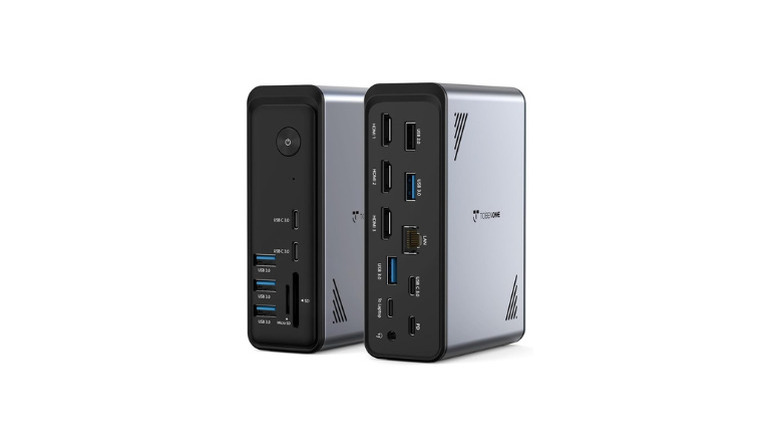
The sheer number of connections available here is what earns this device the multiport laptop adapter title. It is designed to act as the central nervous system of your desk, allowing you to transition from a mobile setup to a full desktop environment with a single cable. The device features 18 integrated ports that cover almost every modern and legacy requirement a professional might have.
The downstream connectivity is divided logically across the front and back of the unit to assist with cable management solutions. On the front, you have easy access to ports you might plug and unplug frequently, while the back handles the semi-permanent connections like monitors and power.
- Display Outputs: Three HDMI ports are available to facilitate multi-display productivity.
- USB Connectivity: A total of six USB-A ports provide plenty of room for legacy peripherals like keyboards, mice, and older external drives. There are also four USB-C ports for modern accessories.
- Data & Media: This multiport usb-c hub with gigabit ethernet and sd card slots includes dedicated UHS-I SD and microSD card readers, making it a viable tool for photographers and video editors.
- Networking: A high-speed Gigabit Ethernet port ensures you aren't relying on flaky Wi-Fi for your Zoom calls or large file transfers.
- Audio: A 3.5mm combo jack for headphones or speakers.
One of the strengths of this laptop docking station is how it handles data transfer speeds. While some cheaper hubs share a single narrow data lane across all ports, the TobenONE uses a more robust internal controller. This ensures that plugging in a thumb drive won't cause your mouse cursor to lag or your internet speeds to drop. It provides a level of plug-and-play functionality that professionals expect when they are moving between meetings and their desks.
Multi-Monitor Performance & DisplayLink Setup
The standout feature of this hub is its ability to function as a USB-C hub for triple monitors. For many modern laptops, especially those without Thunderbolt support, driving three external displays is usually impossible. This device overcomes those hardware limitations by utilizing DisplayLink technology.
If you have been wondering how to connect three monitors to a windows laptop via usb-c, the answer lies in the DisplayLink drivers. Unlike standard "Alt Mode" hubs that just pass through the laptop's existing video signal, this docking station uses an internal chip to compress and send video data. This means even entry-level laptops can support a best usb-c hub for triple 4k monitor setup.
Technical Note: To use the triple monitor functionality, you must download and install the DisplayLink drivers from the official website. This is a one-time setup process that enables the hub to bypass the native video output limits of your laptop's integrated graphics.
While the hub is a powerhouse for Windows and Chrome OS users, it also offers significant benefits for macOS compatibility. Even the base M1, M2, and M3 MacBooks, which are natively limited to a single external display, can use this hub to drive multiple monitors thanks to the same DisplayLink drivers. However, users should note that performance on Mac can vary slightly depending on the resolution and refresh rate of the monitors being used. For most office tasks and multi-display productivity, the performance is seamless.
| Feature | TobenONE 18-in-1 | Anker 575 (USB-C) |
|---|---|---|
| Price (Current Deal) | $100 | ~$140 - $160 |
| Total Ports | 18 | 13 |
| Monitor Support | Triple 4K (DisplayLink) | Triple (MST - Windows only) |
| HDMI Ports | 3 | 2 (+1 DisplayPort) |
| USB-A Ports | 6 | 5 |
| Power Delivery | 100W Pass-through | 85W Output |
Charging & Efficiency: 100W Power Delivery
A docking station is only as good as its ability to keep your machine juiced up. This laptop docking station with 100W power delivery for charging ensures that your laptop stays at 100% battery even during resource-heavy tasks like video rendering or long gaming sessions.
The hub supports 100W power pass-through charging. It is important to understand the difference between input and output here. The hub itself requires a bit of power to run those 17 downstream ports and the internal DisplayLink chip. Usually, you would connect a 120W power adapter to the dock; it then reserves about 15-20W for its own operations and sends a clean 100W to your laptop. This is more than enough for most 13-inch and 15-inch laptops, including the MacBook Pro 14 and various Dell XPS or Lenovo ThinkPad models.
Good workspace ergonomics isn't just about where your monitor sits; it's about reducing the clutter on your desk. By using a Power Delivery docking station, you eliminate the need to carry your laptop's power brick back and forth from the office. You leave one power supply plugged into the TobenONE dock, and your desk remains clean with just a single cable sticking out to meet your computer.
FAQ
What is the difference between a docking station and a USB hub?
A USB hub typically only expands the number of USB ports available and is often bus-powered (drawing power from the laptop). A laptop docking station is a more robust solution designed to turn a laptop into a full desktop. It usually requires its own power source and includes specialized video controllers, Ethernet, and high-wattage charging capabilities that standard hubs lack.
Can a docking station charge my laptop while in use?
Yes, provided it supports Power Delivery and you have a sufficiently powerful wall adapter connected to it. The TobenONE 18-in-1 supports up to 100W of power pass-through, which is enough to charge most professional laptops while they are under heavy load.
How many monitors can you connect to a laptop docking station?
It depends on the specific dock and the technology it uses. The TobenONE 18-in-1 allows you to connect up to three external monitors simultaneously. On Windows and Chrome OS, this can result in four independent screens (including the laptop display). On macOS, the DisplayLink technology allows for multiple extended displays, bypassing the usual single-monitor limit of base M-series chips.
How do I choose the right docking station for my laptop?
First, check your laptop's port specifications. You need a USB-C port that supports Power Delivery and DisplayPort Alt Mode for the best experience. Second, consider your monitor needs. If you want three monitors, look for a dock with DisplayLink technology like the TobenONE. Finally, check the wattage requirements of your laptop to ensure the dock can provide enough power.
Does a docking station need to be plugged into a power outlet?
For a high-density hub like the TobenONE 18-in-1, yes. While some small travel hubs can run off your laptop's battery, a station driving three monitors, Ethernet, and multiple USB devices requires its own dedicated power supply to ensure stable performance and to charge the connected laptop.
Final Verdict: Is the TobenONE Hub Right for You?
The TobenONE 18-in-1 is a specialized piece of kit that solves a very specific problem: how to get a massive amount of connectivity out of a single USB-C port without spending a fortune. Its current status as an affordable 18-in-1 laptop docking station under 100 dollars makes it an easy recommendation for anyone building a home office on a budget.
The build quality is impressive for the price. The aluminum build quality feels premium and does a great job of keeping the internals cool. While the requirement for DisplayLink drivers might be a slight hurdle for those who want a purely plug-and-play experience with no software, the reward is the ability to drive a triple 4K monitor setup that most other docks in this price range simply cannot handle.
If you are a creative professional, a software developer, or an office worker who constantly finds themselves unplugging peripherals to make room for others, this laptop docking station is a transformative upgrade. It excels in multi-display productivity and provides the high-speed Gigabit Ethernet and SD card access needed for a modern workflow. At $100, it is currently the best value-for-money docking station on the market.