Quick Facts
- Top Command Center: Raycast (40ms internal search speed)
- Best for Visuals: Pixelmator Pro ($49.99 one-time purchase)
- Best for Video: Final Cut Pro (Magnetic Timeline efficiency)
- Top Utility: CleanShot X (Cloud upload in less than 3 seconds)
- Performance Lead: Native apps launch up to 4x faster than Electron-based tools
- User Sentiment: 97% of enterprise users feel more productive after switching to Mac
- Monetary Value: Many elite macOS tools avoid recurring monthly subscription fees
While Windows provides a vast ecosystem for gaming and enterprise software, certain macOS productivity apps like Raycast and Pixelmator Pro offer a level of Apple Silicon optimization and native app performance that remains unmatched on PC. These professional macOS applications leverage deep system integration to reduce the friction of daily workflows, making them essential for users who prioritize speed and efficiency.
In the world of professional computing, the hardware you choose is only as good as the software that can actually push it to its limits. As someone who spends all day testing the latest desktop PCs and laptops, I have a deep appreciation for the raw power of the modern Windows ecosystem. However, even the most powerful Windows rig can feel sluggish when the software is poorly optimized. A 2022 Harvard Business Review study found that workers switch between different apps and websites nearly 1,200 times daily, resulting in a loss of five working weeks annually due to context switching.
This is where the Apple ecosystem creates a distinct advantage. Because Apple controls both the silicon and the operating system, developers can create native apps that run with incredible efficiency. According to a survey conducted by Vanson Bourne, 97% of enterprise users feel more productive after switching from a Windows PC to a Mac. Much of this perceived boost comes from a specific class of exclusive Mac software for productivity that simply doesn't exist on the Windows side—or at least, doesn't exist with the same level of polish.
Raycast: The Command Center Windows Can't Match
If you have used Windows PowerToys or the basic Spotlight search on Mac, you have only scratched the surface of what a command-line interface can do for your workflow. Raycast is the ultimate evolution of the launcher. It is not just a place to find files; it is a central hub for workflow automation and window management that replaces a dozen other small utilities.
What sets Raycast apart is its speed and its massive ecosystem. The internal search speed is clocked at a staggering 40ms, making it feel instantaneous even on older hardware. For power users, the real value lies in the community. The macOS-exclusive productivity tool Raycast has grown to include a community of over 22,000 developers who build extensions for its all-in-one command platform. Whether you need to check your Jira tickets, search through Figma files, or control your Spotify playback, there is a Raycast extension that lets you do it without ever touching your mouse.
The integration with the latest macOS Tahoe update takes things even further. Using the new Liquid Glass UI design, Raycast feels like a translucent layer of the operating system rather than a third-party app. It uses native system hooks to handle window management, allowing you to tile windows or move them between monitors with simple keyboard commands. On Windows, you might need three different apps to achieve the same level of menu bar customization and automation.
Why It Beats Windows PowerToys
While Microsoft's PowerToys is a respectable effort, it often feels like a collection of disjointed tools. Raycast is a unified experience. Every extension follows the same design language and keyboard shortcuts. Furthermore, because it is built using native Swift code rather than a cross-platform framework like Electron, the impact on your system resources is negligible. For any professional looking to minimize context switching, Raycast is the single most important utility in the macOS arsenal.
Pixelmator Pro: Professional Creative Power Without the Subscription
One of the biggest frustrations for creative professionals on Windows is the "subscription fatigue" associated with the Adobe Creative Cloud. While Photoshop remains the industry standard, many users find themselves paying a monthly "rent" for features they barely use. Pixelmator Pro has emerged as the premier choice for those seeking a professional-grade raster graphics editor without the recurring costs.
Pixelmator Pro is a masterpiece of Apple Silicon optimization. Because it is built from the ground up for the Mac, it utilizes the Neural Engine in M-series chips to handle AI-driven photo editing tasks. Features like ML Super Resolution, which can upscale low-resolution images while preserving detail, or the automated background removal tool, run significantly faster here than on comparable Windows hardware.
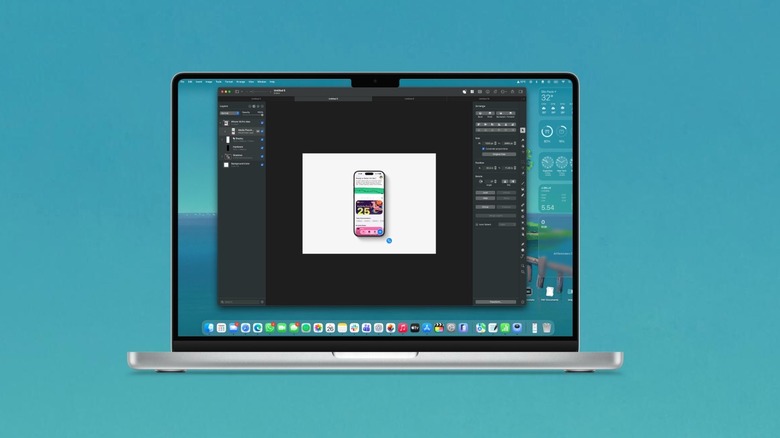
The interface is another area where Pixelmator Pro shines. It follows a single-window design that stays out of your way, making it ideal for UI/UX design workflow and quick layout tasks. It feels like a native part of the OS, adhering to the same design principles as Apple's own professional macOS applications.
The Financial Advantage of Non-Subscription Software
In a market dominated by SaaS models, Pixelmator Pro stands out by offering a one-time purchase model. For roughly $50, you get a lifetime license including major updates. For many independent creators and small business owners, this provides a better long-term value than any Windows alternative. It represents a level of best one-time purchase productivity apps for mac that makes the ecosystem highly attractive to those who want to own their tools rather than lease them.
CleanShot X: Redefining Screen Capture
The Windows Snipping Tool has improved over the years, but it is still a basic utility compared to what is available on macOS. CleanShot X is the gold standard for screen capturing and is frequently cited as one of the must-have macos utility apps for power users. It isn't just about taking a picture of your screen; it's about what happens next.
When you take a screenshot with CleanShot X, a small overlay appears in the corner. From there, you can instantly enter a screen annotation mode to draw arrows, blur sensitive information, or add numbered steps. The app also excels at scrolling capture, allowing you to grab an entire webpage or a long chat history with a single click.
High-Speed Cloud Integration
The killer feature for many is the Cloud Upload. CleanShot X can automatically upload your capture and put a sharing link in your clipboard in less than 3 seconds. For remote teams and developers, this turns a multi-step process into a single action. It also features a built-in screen recording tool that can export clips as GIFs or MP4s, complete with custom backgrounds and mouse highlight effects. This level of menu bar customization ensures that your most-used tools are always one click away, maintaining a high level of native app performance that Windows users often miss.
Final Cut Pro: The Speed of the Magnetic Timeline
Creative professionals often choose macOS for exclusive tools like Final Cut Pro because of the sheer efficiency of the editing process. While Premiere Pro and DaVinci Resolve are available on Windows, Final Cut Pro offers a unique approach to video editing that is deeply tied to the hardware.
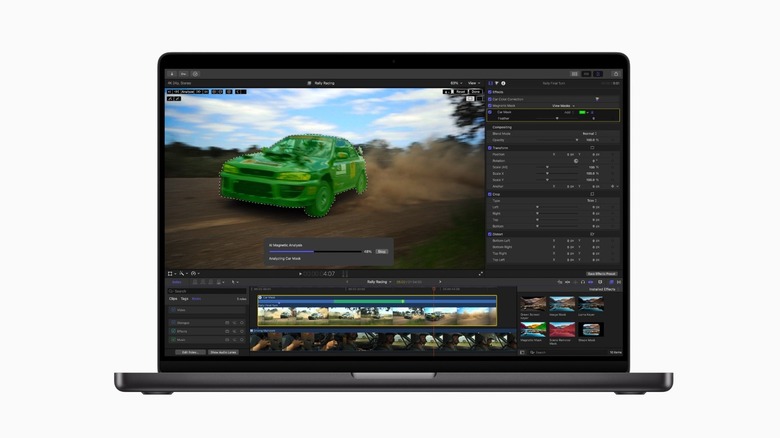
The hallmark of Final Cut Pro is the Magnetic Timeline. Unlike traditional track-based editors found on Windows, the Magnetic Timeline allows clips to snap together and move out of the way as you edit. This prevents sync issues and accidental gaps in the edit, allowing for a much faster "rough cut" phase. When combined with the high performance on Apple Silicon, you can often play back multiple streams of 4K or even 8K video in real-time without the need for proxy files.
Hardware Synergy
The relationship between Final Cut Pro and the M-series chips is a prime example of hardware-software synergy. The app is optimized to use the media engines built directly into the silicon, resulting in export speeds that often dwarf high-end Windows workstations with dedicated GPUs. For professional macos applications for video editing, the time saved on rendering and exporting can translate directly into more billable hours or more time for creative experimentation.
Ulysses: The Sanctuary for Deep Writing
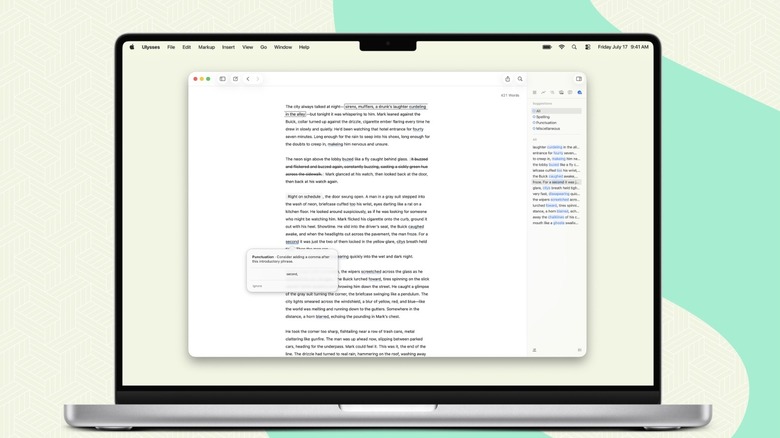
For those who write for a living—whether it's code, technical manuals, or novels—the environment matters. Ulysses is designed specifically for focus and deep work on macOS. It provides a distraction-free writing environment that strips away the complex toolbars of Microsoft Word in favor of a clean, markdown editor interface.
Ulysses isn't just a text editor; it is a comprehensive library for your thoughts. It uses a folder-less organizational system that allows you to manage thousands of sheets (documents) in a single sidebar. Because it is a native app, it leverages system-level hooks for advanced grammar checks and organization, ensuring that the software never slows down your train of thought.
Why Writers Prefer the Mac Ecosystem
The appeal of Ulysses lies in its native app performance and the way it handles markdown support. It allows writers to focus entirely on content creation before moving to the editing or publishing phase. The built-in export styles allow you to turn a simple markdown file into a perfectly formatted PDF, ePub, or WordPress post with a single click. It is widely considered one of the best mac apps for creative work 2026 due to its consistent updates and commitment to the Apple design philosophy.
Other Notable Mentions
While the five apps above are the heavy hitters, the macOS ecosystem is filled with smaller, high-impact utilities that improve the quality of life for power users.
- DaisyDisk: A visual storage management tool that allows you to "see" your files as an interactive map, making it incredibly easy to find and delete large, forgotten files. It provides a far more intuitive experience than the Windows Disk Management or TreeSize.
- Portal: Designed for focus, Portal immerses users in high-quality nature sounds and spatial audio with cinematic wallpapers that sync to the time of day. It is a masterclass in how macOS apps for windows switchers can create a sense of calm in a busy workday.
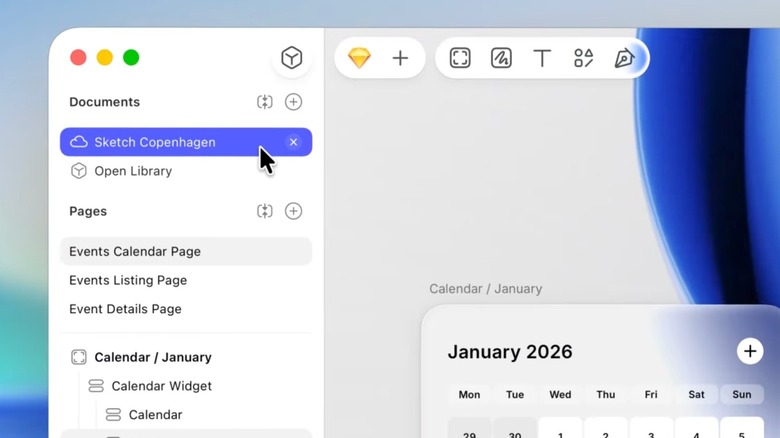
- Sketch: Though Figma has become popular on both platforms, Sketch remains a premier choice for prototyping and layout, offering a native experience optimized for the Apple ecosystem that many UI/UX designers still swear by.
Conclusion: The Professional Edge
As a hardware editor, I will always love the flexibility of the PC. If you want to build a water-cooled monster with three GPUs, Windows is your home. But for those whose work revolves around software efficiency, the exclusive Mac software for productivity mentioned here creates a compelling argument for the Apple platform.
These apps aren't just "nice to have." They represent a fundamental difference in how software is designed. By prioritizing native app performance and Apple Silicon optimization, developers like those behind Raycast and CleanShot X have created tools that don't just help you work—they get out of your way. For the professional seeking to reclaim those five lost weeks of productivity, the switch to macOS might be the best hardware upgrade you can make.
FAQ
Which apps are essential for boosting productivity on macOS?
For most users, Raycast is the most essential starting point because it consolidates so many different utilities into one launcher. If your work involves a lot of communication or documentation, CleanShot X is the next logical step. These two apps alone can significantly reduce the time you spend navigating menus and managing files.
How can I stay organized using my Mac?
Organization on Mac is often best handled by apps that leverage the native file system and Spotlight indexing. Tools like Ulysses for writing or DaisyDisk for storage management help keep your digital workspace clean. Additionally, using Raycast for window management can keep your screen organized and prevent the clutter of overlapping windows.
Does macOS have built-in productivity features?
Yes, macOS includes several built-in features like Stage Manager for window organization, Spotlight for search, and Shortcuts for basic automation. However, the third-party apps mentioned in this guide are popular because they take these basic concepts and expand them with much deeper functionality and better optimization for professional workflows.
What are the best Mac apps for focus and deep work?
Ulysses is widely considered the best for writing-focused deep work due to its minimalist design. For general focus, Portal is excellent for creating a calming environment using spatial audio. Both apps are designed to minimize distractions and help you enter a flow state more quickly than traditional multi-purpose software.