Quick Facts
- Display Tech: High-resolution Micro-OLED panels providing up to 120Hz refresh rate and peak brightness over 1000 nits.
- Portability: Pocketable form factor weighing between 72g and 88g, much lighter than traditional VR headsets.
- Screen Real Estate: Supports up to 3 virtual monitors via spatial software, creating a massive workspace from a single laptop.
- Eye Care: Features built-in diopter adjustments for nearsighted users or support for custom prescription lens inserts.
- Compatibility: Requires a device with USB-C DisplayPort Alt Mode to transmit video and power over a single cable.
- Hardware Replacement: Can effectively replace multiple physical monitors for mobile professionals and digital nomads.
AR smart glasses for work are no longer just science fiction; they are becoming a viable tool for digital nomads and power users. While the promise of replacing monitors with smart glasses is enticing, the transition involves a steep learning curve and specific technical requirements that can fundamentally change your productivity workflow.
I have spent the last decade reviewing every major leap in PC hardware, from the first consumer SSDs to the latest 40-series GPUs. But nothing quite prepares you for the moment you decide to pack up your 27-inch dual-monitor setup and replace it with a pair of glasses that weigh less than a deck of cards. Working in augmented reality isn't just about having a screen in front of your eyes; it is about decoupling your workspace from the physical constraints of your desk. However, as any PC builder knows, the specs on the box only tell half the story. To truly understand if AR smart glasses for work are ready for your 9-to-5, we need to look past the marketing hype and into the technical friction of daily use.
The Multi-Monitor Workflow: Beyond the Screen
When most people first try AR smart glasses for work, they think of it as "mirroring." You plug the glasses into your MacBook or Windows handheld, and your screen appears in the air. While this is great for watching a movie on a plane, it is a poor way to handle professional productivity. For a real workflow, you need a spatial desktop. This is where software like Xreal Nebula or Viture Spacewalker comes into play, utilizing the onboard sensors to enable 3DoF head tracking.
In a 3DoF (Three Degrees of Freedom) setup, the virtual screens are not locked to your face. Instead, they utilize screen anchoring to stay fixed in 3D space. You can have your Slack window to your left, your primary coding environment in the center, and a browser for documentation to your right. When you turn your head, the screens stay put. This mimics the experience of a physical multi-monitor setup without the desk clutter.
The technical metric that matters most here is PPD (Pixels per degree). While a 4K monitor on your desk looks sharp because of its pixel density, AR glasses are often limited by their field of view (FOV), which typically ranges from 46 to 52 degrees. If the PPD is too low, text becomes difficult to read, leading to "screen door effect." In our testing, the latest Micro-OLED technology used by brands like Xreal and Viture provides enough clarity for most text-based tasks, but you will find yourself adjusting virtual monitor size and distance in AR to find the sweet spot where you aren't constantly squinting.
| Feature | Xreal Air 2 Ultra | Viture Pro XR |
|---|---|---|
| Field of View (FOV) | 52 Degrees | 46 Degrees |
| Weight | 80g | 78g |
| Peak Brightness | 500 Nits | 1000 Nits |
| Refresh Rate | 120Hz | 120Hz |
| PPD | 49 | 49 |
Ergonomic Liberation: Solving the Laptop Hunch
One of the most immediate benefits I noticed when testing a spatial computing setup for MacBook with AR glasses was the relief in my neck and shoulders. Most of us suffer from the "laptop hunch," where we lean forward and look down at a screen. Over a ten-hour workday, this puts immense strain on the cervical spine.
Because AR smart glasses for work project the image directly into your line of sight, you can maintain a neutral spine. You can sit in a recliner, stand at a desk, or even lie flat on your back while maintaining eye-level virtual monitors for neck pain relief. This flexibility is a game-changer for those with chronic back issues. In fact, many users find that AR smart glasses ergonomics are superior to fixed VESA-mounted monitors because the "monitor" moves with your natural posture adjustments.
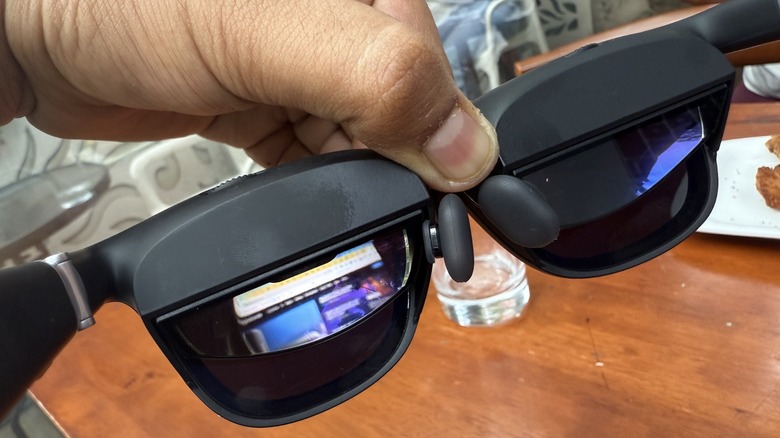
However, the weight distribution of the glasses themselves is a critical factor. Even at 75 grams, a pair of glasses that sits heavily on the bridge of your nose can become uncomfortable after three hours. The best AR smart glasses for multi-monitor work setup are the ones that balance the weight across the temples and the nose bridge effectively. We found that utilizing the "Body Anchor" mode in software is essential; if the screen follows your head too smoothly (Smooth Follow), it can actually lead to more neck fatigue as your eyes and neck muscles struggle to stabilize the image.
The Reality of the First Week: Adaptation & Fatigue
If you are thinking about replacing monitors with smart glasses, you need to prepare for an adaptation period. It isn't as simple as plugging them in and being 100% productive. Your brain has to adjust to what we call vestibular mismatch—the sensation that your eyes see movement (or a static virtual object) that your inner ear doesn't feel.
In the global smart AR glasses market, enterprise end-users accounted for approximately 67.3% of the total revenue in 2024, proving that the business world is betting heavily on this tech. Yet, the physical cost is real. Statistics show that up to 60% of first-time augmented reality users report feeling nauseous after just 10 to 20 minutes of use. This can jump to 80% during longer, high-intensity sessions.
To manage eye fatigue during long AR work sessions, we recommend following the "20-20-20" rule but with a twist. Every 20 minutes, take the glasses off and look at something 20 feet away for 20 seconds. Additionally, pay attention to the electrochromic dimming features. Some glasses allow you to tint the outer lenses to block out ambient light interference. While this makes the virtual monitors pop, it can also increase the feeling of isolation and eye strain if used in a pitch-black room. Maintaining some peripheral awareness is usually better for long-term comfort.
Logistics and Hidden Frictions
The marketing photos always show a wireless, seamless experience. The reality of how to replace laptop screen with AR glasses involves wires. Unless you are using a dedicated compute puck, your glasses will be tethered to your laptop or phone via a USB-C cable. Managing this tethered experience is a skill in itself. I recommend using a right-angle USB-C adapter to keep the cable from tugging on your frames.
Then there is the issue of vision. If you wear glasses, you cannot simply wear them under AR frames. You will need to look into using prescription lens inserts with AR work glasses. Some newer models, like those from Viture, have built-in diopter adjustments that can compensate for myopia, but if you have a complex astigmatism, custom inserts are a hidden cost you must factor in.
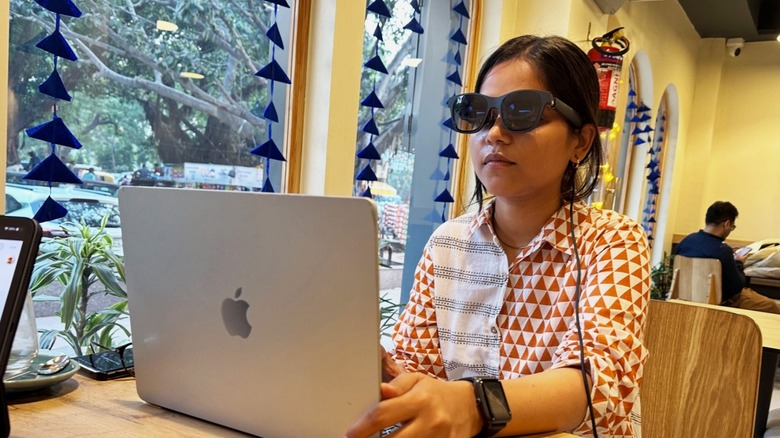
Finally, there is the social aspect. Wearing specialized eyewear in a public professional setting like a coffee shop or a shared office can feel like you are in the "social uncanny valley." People aren't sure if you can see them or if you are filming them. The privacy benefits of AR glasses for remote work are massive—no one can "shoulder surf" and see your sensitive data—but you have to be prepared for the occasional stare from curious onlookers.

FAQ
Can AR smart glasses replace computer monitors?
Yes, for many users, AR smart glasses can effectively replace a traditional monitor setup, especially for mobile work. By using spatial software, you can create a virtual multi-monitor environment that provides more screen real estate than a standard laptop. However, for tasks requiring absolute color accuracy or extremely high resolution for professional video editing, a high-end physical monitor still holds the edge in PPD and color gamut.
Are AR smart glasses comfortable enough for all-day use?
Comfort is subjective and depends on the specific hardware. Most AR glasses weigh under 90 grams, which is light, but still heavier than standard spectacles. While the ergonomic benefits for your neck are significant, you may experience pressure on your nose bridge or temples. We recommend starting with 30-minute sessions and gradually increasing time to avoid eye fatigue and physical discomfort.
How do AR smart glasses improve employee productivity?
AR smart glasses improve productivity by providing a massive, portable workspace that allows for better multitasking. They enable a focused, "deep work" environment by blocking out visual distractions in public spaces. Furthermore, by improving posture and reducing neck pain, they can help employees work longer hours without the physical discomfort typically associated with mobile computing.
What are the benefits of using AR smart glasses for work?
The primary benefits include postural freedom, enhanced privacy, and massive screen real estate in a portable form factor. They allow you to maintain a neutral spine by positioning screens at eye level, protect your data from prying eyes in public, and provide a multi-monitor experience that fits in your pocket, making them ideal for the digital nomad lifestyle.
Are there privacy risks when using smart glasses in an office?
From a data security perspective, AR glasses actually enhance privacy because the "screen" is only visible to the wearer. However, from a social perspective, some colleagues may feel uncomfortable if the glasses have integrated cameras. Most productivity-focused glasses, like the Xreal Air or Viture Pro, do not have cameras, which helps mitigate these social and privacy concerns in a traditional office environment.