Quick Facts
- Discovery Date: February 2026
- Risk Level: Critical (High Severity)
- Compatibility: Android versions 5 through 16; iOS versions up to 26.2
- Primary Targets: Financial applications (Binance, MetaMask, PayPal), SMS OTPs, and private communications
- Infection Method: Social engineering, smishing, and malicious payloads delivered via untrusted Telegram links
- Market Model: Malware-as-a-Service (MaaS) with subscriptions starting at $250 per day
To ensure ZeroDayRAT protection, users must avoid sideloading apps from untrusted sources, disable 'Install from Unknown Sources' on Android, and keep iOS devices updated to the latest security patch to prevent remote access malware. By adhering to strict digital hygiene and utilizing only official app repositories, you can significantly reduce the risk of falling victim to this highly professionalized surveillance tool.
The Rise of ZeroDayRAT: A New Era of Mobile Insecurity
As an editor who spends my days dissecting the latest silicon and software architectures, I have watched the mobile threat landscape evolve from simple adware to sophisticated state-level surveillance tools. However, the emergence of ZeroDayRAT in early 2026 represents a disturbing shift toward the democratization of high-end spyware. This is not just another virus; it is a professional-grade surveillance suite sold on the open market.
The urgency for ZeroDayRAT protection has never been higher. According to recent mobile security data, banking trojans and spyware attacks on Android users increased by 29% in the first half of 2025 compared to the previous year. This trend has culminated in the release of ZeroDayRAT, a cross-platform threat that effectively erases the security gap between Android and iOS. Whether you are carrying the latest flagship or an older device, the reality is that your private data is now a commodity.
The creators of this malware utilize social engineering tactics to trick users into installing malicious payloads. Often disguised as "system updates" or "leaked apps" shared via messaging platforms, these files grant attackers deep access to your digital life before you even realize anything is wrong.
How ZeroDayRAT Operates: Beyond Standard Spyware
What makes ZeroDayRAT particularly terrifying is its business model. It is distributed as Malware-as-a-Service (MaaS), meaning any bad actor with a credit card or a crypto wallet can rent this power. This malware is sold as a service on Telegram with subscription pricing set at $250 per day, $1,000 per week, or $3,500 per month. For that price, the attacker gets access to a centralized dashboard where they can manage multiple infected devices with point-and-click ease.
Once inside, the RAT (Remote Access Trojan) begins its execution phase. Unlike older malware that simply stole contact lists, ZeroDayRAT engages in real-time data exfiltration. It utilizes system-level permissions to capture every movement on your device. For instance, the software employs credential harvesting through sophisticated screen recording and keystroke logging. This allows it to see your passwords as you type them, even if the app itself is encrypted.
One of its most lethal features is clipboard address injection. If you are a cryptocurrency user, the RAT monitors your clipboard for wallet addresses. When you copy a destination address for a transfer, the malware replaces it with the attacker's address in a fraction of a second. If you don't double-check the string before hitting "send," your funds are gone forever.
| Feature | Attacker Dashboard Capability | User Experience Impact |
|---|---|---|
| Live Surveillance | Remote activation of camera and microphone feeds. | Potential battery drain and heat; privacy breach. |
| Financial Theft | Interception of SMS for 2FA and clipboard replacement. | Unauthorized transfers from Binance or PayPal. |
| Data Harvesting | Real-time screen recording and keylogging. | All private messages and passwords exposed. |
| Movement Tracking | Continuous GPS location history monitoring. | Complete loss of physical privacy. |
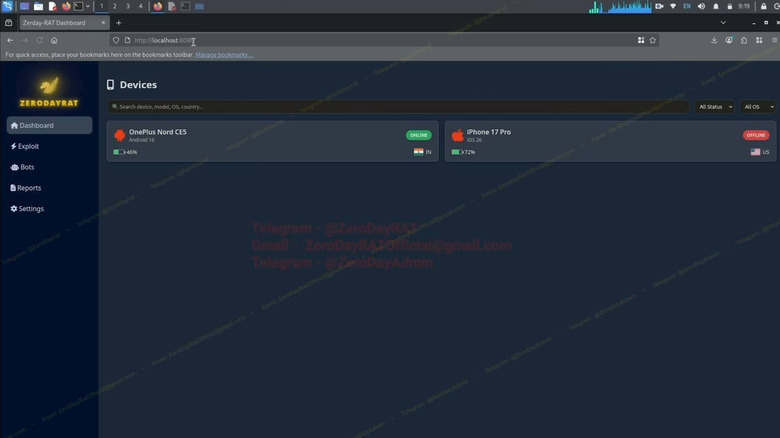
The ability to know how to stop ZeroDayRAT keystroke logging and screen recording is critical because these tools allow the attacker to bypass the security of encrypted messengers like Signal or WhatsApp. They aren't breaking the encryption; they are simply watching you type the message before it even gets encrypted.
Securing Your Device: A Smartphone Security Checklist
Protecting yourself against a tool this advanced requires a multi-layered defense. You cannot rely on a single "security app" to do the work for you. Instead, you must focus on mobile OS hardening and maintaining a strict perimeter around your device.
For those seeking ZeroDayRAT protection for mobile banking apps, the most important step is to transition away from SMS-based two-factor authentication. Because ZeroDayRAT can intercept SMS notifications, it can steal your One-Time Passwords (OTPs) in real-time. Whenever possible, use hardware security keys or authenticator apps that generate codes locally on your device, though even these can be vulnerable to screen recording.
Follow this checklist to secure your smartphone:
- Stick to official app repositories: Never download APKs or iOS profiles from websites or Telegram groups. The Apple App Store and Google Play Store have rigorous scanning processes that ZeroDayRAT seeks to avoid.
- Securing android devices against sideloaded zerodayrat malware: Go into your Android settings and ensure that "Install Unknown Apps" is disabled for all browsers and messaging apps. This prevents the "drive-by" installation of malicious payloads.
- Keep your OS updated: ZeroDayRAT targets Android 5 through 16 and iOS up to 26.2. Manufacturers release security patches specifically to close the loopholes these RATs exploit. If your phone is no longer receiving updates, it is time for a hardware upgrade.
- Audit your permissions: Periodically check which apps have access to your "Accessibility Services" and "Notification Access." ZeroDayRAT often hides here to log keystrokes and read incoming messages.
- Be skeptical of links: Preventing ZeroDayRAT infection from untrusted telegram links is your first line of defense. If a stranger or even a friend sends you a link to a "must-have" tool or a "security fix" on Telegram, do not click it.
Detection: Signs Your Phone is Infected
Because ZeroDayRAT is designed to be invisible, you have to look for the secondary effects of its presence. It is constantly communicating with a Command and Control (C2) server to send your data back to the attacker, which leaves a digital footprint.
If you are wondering how to detect ZeroDayRAT on android and iphone, start by looking at your battery and data usage stats. Real-time data exfiltration requires significant power and bandwidth. If your phone is getting hot while sitting idle in your pocket, or if you see a spike in background data usage from an app you don't recognize, it is a major red flag.
Another key indicator is the "spirit in the machine" phenomenon. If you notice signs your phone is infected with ZeroDayRAT spyware, such as the camera or microphone privacy indicators (the green or orange dots in the corner of your screen) flickering on when you aren't using a recording app, someone may be watching you. Furthermore, if your banking app or cryptocurrency wallet suddenly logs you out or reports "new device login" notifications that weren't triggered by you, your credentials have likely been harvested.

If you suspect a device compromise, the safest course of action is a full factory reset. However, be warned: if you restore from a backup that was taken after the infection, you may simply be reinstalling the malware. A clean start is often the only way to ensure mobile spyware prevention is successful.
FAQ
What is ZeroDayRAT and how does it work?
ZeroDayRAT is a sophisticated, cross-platform remote access trojan that allows attackers to take complete control of a mobile device. It works by tricking users into installing a malicious app, which then uses system-level permissions to record the screen, log keystrokes, and access the camera and microphone. This data is then sent back to an attacker's dashboard in real-time.
What are the best practices for ZeroDayRAT protection?
The best practices include only using official app repositories like the Google Play Store or Apple App Store, keeping your operating system updated to the latest version, and disabling the installation of apps from unknown sources. Additionally, users should be extremely cautious of links sent via messaging apps like Telegram and use non-SMS based two-factor authentication (2FA) for sensitive accounts.
What are the symptoms of a ZeroDayRAT infection?
Common symptoms include rapid and unexplained battery drain, the device feeling hot when not in use, and a sudden increase in background data usage. You should also watch for unauthorized activation of the camera and microphone indicators and unexpected activity in your financial or social media accounts, which may indicate that your login credentials have been stolen.
Can standard antivirus software block zero-day RAT attacks?
Standard antivirus software often struggles with zero-day attacks because these threats use brand-new code that has not yet been added to security databases. While some advanced mobile security suites use behavioral analysis to detect suspicious activity, they are not 100% effective against professional-grade spyware that is designed to mimic legitimate system processes.
How do remote access trojans bypass traditional security measures?
Remote access trojans often bypass security by exploiting human psychology rather than software vulnerabilities. They use social engineering to convince the user to grant them broad permissions, such as Accessibility Services. Once these permissions are granted, the malware can bypass 2FA by reading screen content or intercepting SMS messages, effectively working "around" the encryption and security protocols of individual apps.
Closing Thoughts: Staying Ahead of the Threat
In the world of mobile technology, convenience often comes at the cost of security. ZeroDayRAT is a stark reminder that the devices we carry in our pockets are powerful windows into our private lives—and those windows can be opened from the outside if we aren't careful.
Your smartphone security checklist should be a living document, updated as new threats emerge. By maintaining a posture of "informed urgency," you can enjoy the benefits of a connected life without becoming a statistic in an attacker's dashboard. Take five minutes today to check your app permissions and update your OS; it is the simplest and most effective way to ensure your personal data remains yours alone.